cancel
Showing results for 
Search instead for 
Did you mean: 

The Power BI Data Visualization World Championships is back! Get ahead of the game and start preparing now! Learn more

Reply
adcook
Frequent Visitor

Mobile Geo Filtering not Working

I currently have a lot of customer data coming into PowerBI and can't seem to figure out why the Geo location filtering will not work in the mobile app. What is odd, is that it used to work about two months ago. I have been making changes though and can't figure out why it stopped working. I have check and I am only using each "location" data category once. I am using country, state, city, address and postal code only once. A question I have is that I do leverage web url data category more than once in the database, so would that hinder it. I know it says on PowerBI you can leverage a data category only once, so I assume it was location based ones only. Is there another setting I need to consider? I have tested it on mulitple devices in which location services is turned on. Any thoughts or ideas would be appreciated.


Thanks!

3 REPLIES 3
adcook
Frequent Visitor

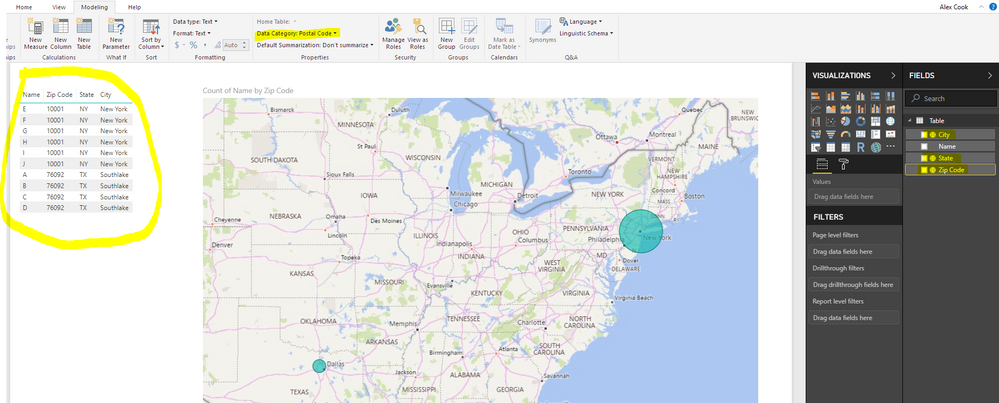
I wanted to add to my issue. Please see screen shot below. I decided to create a dummy dataset (see table on left) and post it to PowerBI warkspace. When I log into my mobile device I cant see geo filtering as an option even with this simple dataset, I currently reside in one of the zip code locations, so it should give me an option to reduce the data down right? You can see that I have selected location data categories for state, city and zip code. Any ideas would be great. This is the last thing I need in place to enable my sales force with some neat functionality, and I cant get it to work with even a simple model. Whats odd is about a month ago this all worked.

GeoFilterMobileIssue.PNG

Anonymous
Not applicable

Hi @adcook,


Which device you test and faced the issue? Ios or Android?

I think this issue is more related to power bi mobile app, I'd like to suggest you contact to mobile team to confirm this.


Regards,
Xiaoxin Sheng

Thanks. I have been in touch with the mobile team and the fix is coming in the next few weeks.

Helpful resources

Announcements
Power BI DataViz World Championships

Power BI Dataviz World Championships

The Power BI Data Visualization World Championships is back! Get ahead of the game and start preparing now!

December 2025 Power BI Update Carousel

Power BI Monthly Update - December 2025

Check out the December 2025 Power BI Holiday Recap!

FabCon Atlanta 2026 carousel

FabCon Atlanta 2026

Join us at FabCon Atlanta, March 16-20, for the ultimate Fabric, Power BI, AI and SQL community-led event. Save $200 with code FABCOMM.