Get certified for free when you join Fabric Data Days 2026 and dive into Fabric, Power BI, SQL, AI, and other essential data skills.
Join nowJuly 7 - July 17 | Round 2 of the Power BI Dataviz World Championships. Don't miss your chance! Learn more
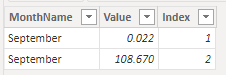
I have 2 tables. One is a fact table (monthly expenses) the other is a monthly budget. After I create a merge of the two data tables, in the matrix, the values for the budget is either missing or sums up the budget incorrectly. It doesnt want to sit side by side by months on the matrix. I tried everything, create a index and its doesnt work. I just dont understand what could be wrong.
Its not the data, I checked countless times. Its how PowerBi is reading the values.
Hi @Anonymous ,
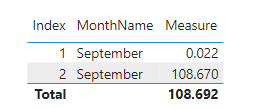
Do you mean that in the matrix Totar is incorrect, You can create a Measure, use HASONEVALUE and IF to make judgments, and make sure Total is correct.
Here are the steps you can follow:
1. Create measure.
Measure =
var _sum=
SUMMARIZE('Table','Table'[MonthName],"Value",SUM('Table'[Value]))
return
IF(
HASONEVALUE('Table'[Index]),MAX('Table'[Value]),SUMX(_sum,[Value]))
2. Result:
If I have misunderstood your meaning, please provide your pbix file without privacy information and desired output.
Best Regards,
Liu Yang
If this post helps, then please consider Accept it as the solution to help the other members find it more quickly
Join us in Barcelona for FabCon and SQLCon, the Fabric, Power BI, SQL, and AI community event. Save €200 with code FABCMTY200.
Join Data Days 2026: 60 days of free live/on-demand sessions, challenges, study groups, and certification opportunities.
| User | Count |
|---|---|
| 22 | |
| 10 | |
| 10 | |
| 6 | |
| 4 |
| User | Count |
|---|---|
| 32 | |
| 25 | |
| 18 | |
| 18 | |
| 17 |