Join us at FabCon Atlanta from March 16 - 20, 2026, for the ultimate Fabric, Power BI, AI and SQL community-led event. Save $200 with code FABCOMM.
Register now!Learn from the best! Meet the four finalists headed to the FINALS of the Power BI Dataviz World Championships! Register now
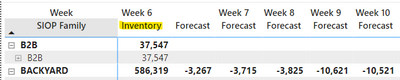
Is there a way within a matrix visual to display 1 column for 1 value and all columns for a 2nd value? Below is how I want the information displayed. Inventory (Value 1) for current week only, and forecast (Value 2) for all subsequent weeks.
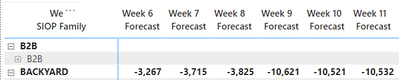
My current work around is shrinking all inventory columns to be hidden, similar to Excel (columns A, B, C displayed and then hide every inventory column D, F, H, etc). That would work however when this report updates weekly for 1st column as current week it maintains which columns are hidden rather than shift them like Excel would.
This is what the following week would display: Column B now hidden in addition to D, F, H, etc. Unlike Excel where the formatting is maintained on the column, Power BI seems to maintain the formatting on the data (all inventory columns in this case) and my current week inventory is no longer displayed.
Any thoughts on how to display this correctly?
Share feedback directly with Fabric product managers, participate in targeted research studies and influence the Fabric roadmap.
Check out the February 2026 Power BI update to learn about new features.