This time we’re going bigger than ever. Fabric, Power BI, SQL, AI and more. We're covering it all. You won't want to miss it.
Learn moreDid you hear? There's a new SQL AI Developer certification (DP-800). Start preparing now and be one of the first to get certified. Register now
Hi All
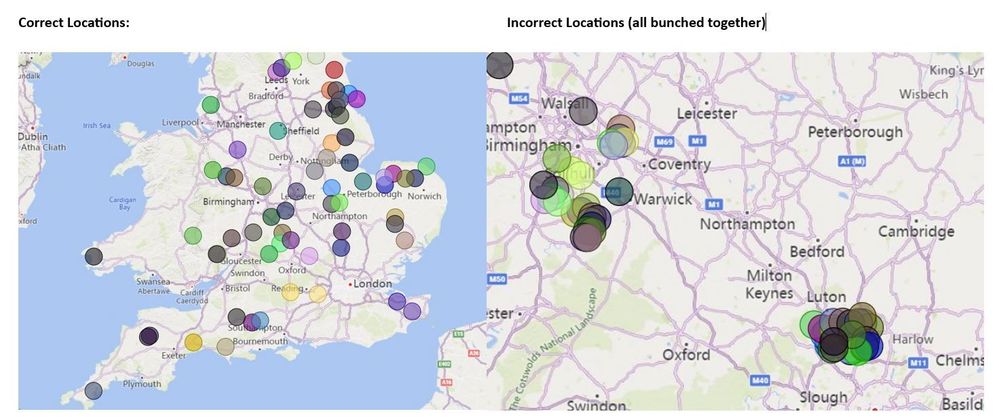
I have a random issue, hope you can help! I have a map published on the service showing UK locations based on postcodes. When I view the map in edge, the plotted bubbles on the map sit in the correct locations. When my colleague looks at the same map in edge, the bubbles are all bunched together (not in correct locations). I have checked the language settings to make sure he has English-UK as the top option and his settings are the same as mine. What is happening? How do we fix it?
As you can see below, on the left is my map, I have 1 or 2 bubbles near north London, where as on the map on the right, there is a big bunch in the same area. This stays the same if my colleague zooms out or I zoom in.
Thanks
Solved! Go to Solution.
My colleague cleared his cache, so simple, but that fixed the issue.
How many data points are you trying to display in total? do you see the blue "i" ? If yes then Power BI will randomly cut off your data and show random variations.
There are 160 data points on this map in total and with this filtered as we both have about 80 are showing. There is no blue 'i'.
If you have a Pro license you can open a Pro ticket at https://admin.powerplatform.microsoft.com/newsupportticket/powerbi
Otherwise you can raise an issue at https://community.fabric.microsoft.com/t5/Issues/idb-p/Issues .
Check out the April 2026 Power BI update to learn about new features.
If you have recently started exploring Fabric, we'd love to hear how it's going. Your feedback can help with product improvements.
| User | Count |
|---|---|
| 11 | |
| 10 | |
| 9 | |
| 8 | |
| 8 |
| User | Count |
|---|---|
| 49 | |
| 27 | |
| 25 | |
| 20 | |
| 20 |