cancel
Showing results for 
Search instead for 
Did you mean: 

Next up in the FabCon + SQLCon recap series: The roadmap for Microsoft SQL and Maximizing Developer experiences in Fabric. All sessions are available on-demand after the live show. Register now

Reply
franked
New Member

Mailchimp service connection fail - API issue

Dear MS, 


My Mailchimp service dataset is not connecting. It's failing at the API handshake bit. This is what Mailchimp had to say when I raised it with them: 


"I’m not aware of any issues from MailChimp’s end.  I do know that in December MailChimp now supports API 3.0 exclusively and all other versions of the API have been retired and are no longer supported.  The time frame of when you started seeing interruptions to me sounds like the integration is using an old version and that may be the reason why you’re seeing issues.  So I would definitely reach out to the developers to inquire about that and see if they have any insight."


Can you please advise?

2 REPLIES 2
QueryWhiz
Post Patron
Post Patron

Hi @franked I know this reply is very late. Since there’s no built-in connector for Mailchimp to PBI anymore, you will have to look for another option. As a workaround, maybe you can use a 3rd party connector, it can save you a lot of time compared to other options. I've tried windsor.ai, supermetrics and funnel.io. I stayed with windsor because it is much cheaper so just to let you know other options. In case you wonder, to make the connection first search for the Mailchimp connector in the data sources list:


MAILCHIMP-1.jpg


After that, you will have to first create a secret API key in your Mailchimp account and then using your credentials add your account to the platform.


MAILCHIMP-2.jpg


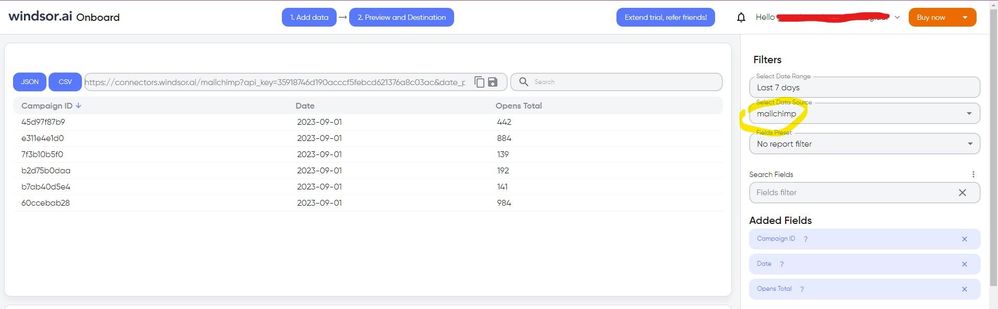
Once you’ve done this, you can proceed and go to the “Preview and destination” step


MAILCHIMP-3.jpg


There just select the fields you need. Finally, just select PBI as your data destination and finally just copy and paste the url on PBI --> Get Data --> Web --> Paste the url. 


SELECT_DESTINATION_NEW.png

KumarDarmesh
Helper IV
Helper IV

For this kind of issue, I think you'll have to create a support ticket.

support.powerbi.com

Helpful resources

Announcements
New to Fabric survey Carousel

New to Fabric Survey

If you have recently started exploring Fabric, we'd love to hear how it's going. Your feedback can help with product improvements.

Power BI DataViz World Championships carousel

Power BI DataViz World Championships - June 2026

A new Power BI DataViz World Championship is coming this June! Don't miss out on submitting your entry.

Join our Fabric User Panel

Join our Fabric User Panel

Share feedback directly with Fabric product managers, participate in targeted research studies and influence the Fabric roadmap.

March Power BI Update Carousel

Power BI Community Update - March 2026

Check out the March 2026 Power BI update to learn about new features.