Join us at FabCon Atlanta from March 16 - 20, 2026, for the ultimate Fabric, Power BI, AI and SQL community-led event. Save $200 with code FABCOMM.
Register now!The Power BI Data Visualization World Championships is back! Get ahead of the game and start preparing now! Learn more
Dear Team,
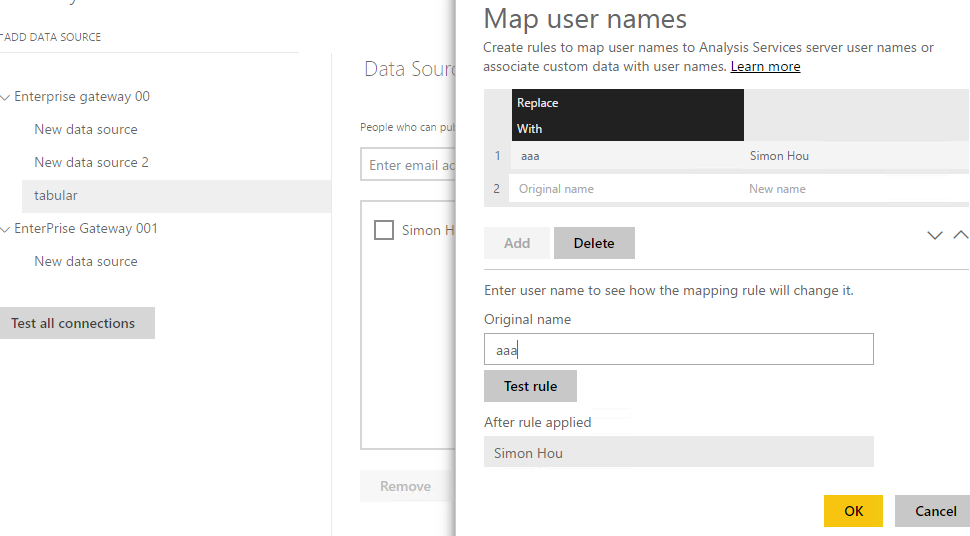
I am facing an issue with map username feature in SSAS data source. Replace with feature is not working, once you add all infor and click OK it throws error.
Since SSAS works with UPN name, we were using this feature to change the usename to UPN for accessing the database. It was working fine before.
Thanks!
Shamsuddeen
Dear,
I am getting the below error message when i use the map user names in ssas tabular data source. I was able to add the users and it was working perfectly fine, however it is not working as desired now.
ail to update user name mappings, please try again later.
Please try again later or contact support and provide the following details to help resolve your issue faster.
BR,
Shamsuddeen
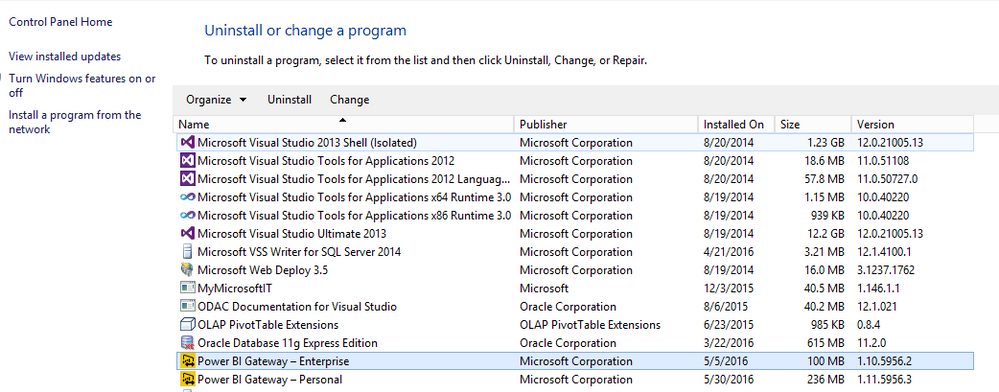
What's the version of you Enterprise-Gateway?
I haven't reproduced your issue. My Enterprise-Gateway version is 1.10.5956.2. Please update latest version update, re-configure or restore your existing Gateway.
However, I can't directly edit existing rule in "Map User Name" either. I have to delete the existing rule and add new one.
Regards,
Thanks @v-sihou-msft.
It looks like there is some issue with the proxy in my network. when I remove those it is working fine.
Even I had tried outside my network as well before without success earlier. It is fine now.
BTW, how can we check the enterprise gateway version?
Thanks!
Shamsuddeen
@shamsuddeenvp, is this issue existing? If yes, please provide us the detailed error messages you got.
Thanks @Vicky_Song
It has been resolved. We do still face the issue with the gateway goes offline very often.
Br
Shamsuddeen
The Power BI Data Visualization World Championships is back! Get ahead of the game and start preparing now!