Share feedback directly with Fabric product managers, participate in targeted research studies and influence the Fabric roadmap.
Sign up nowGet Fabric certified for FREE! Don't miss your chance! Learn more
Hi,
Issue using Group By within Dataflow, how to fix it?
Steps to reproduce
Power BI Service > Workspaces > Dataflows > Create Dataflow > Define new entities > OData > Enter Business Central 261 G/L Entries OData URL.
Remove all columns except:
-G_L_Account_No
-Posting_Date
-Dimension_Set_ID
-Amount
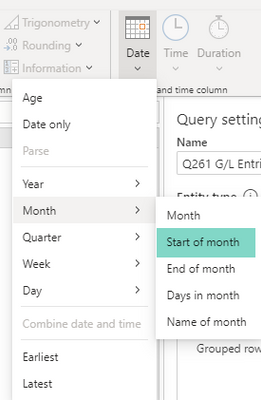
Highlight Posting_Date > Transform > Date > Month > Start of month
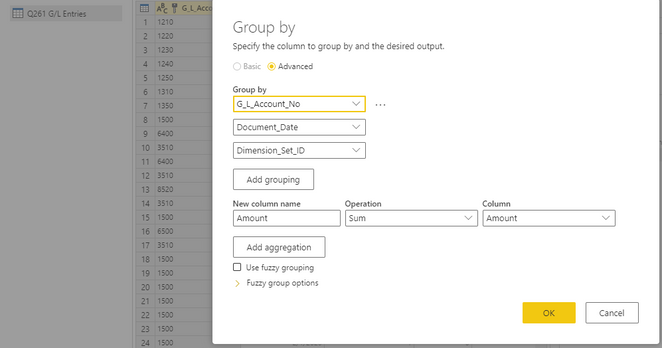
Group By > Advanced > Group By all except Amount, SUM Amount
After that it throws the following error:
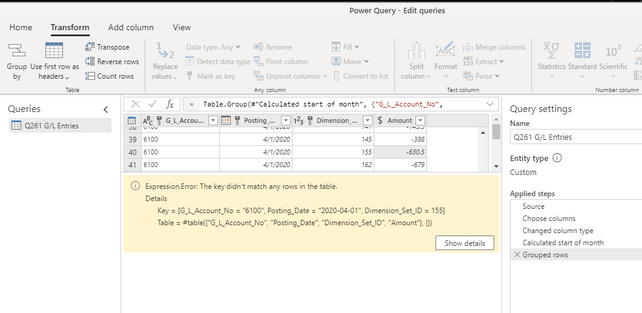
Expression.Error: The key didn't match any rows in the table.DetailsKey = [G_L_Account_No = "6100", Posting_Date = "2020-04-01", Dimension_Set_ID = 123]
Table = #table({"G_L_Account_No", "Posting_Date", "Dimension_Set_ID", "Amount"}, {})
Tried the same Group By using Document Date > Transform > Date > Month > Start of month which also produces the same error.
Doing a Group By without a Date columns works perfectly well, but I need the Posting Date 😞
Before Group By the Posting Dates shows perfectly well, no errors.
How can this be fixed?? Any suggestions please?
@Landcrab - Not sure, love the handle though.
You could check the Issues forum here:
https://community.powerbi.com/t5/Issues/idb-p/Issues
And if it is not there, then you could post it.
If you have Pro account you could try to open a support ticket. If you have a Pro account it is free. Go to https://support.powerbi.com. Scroll down and click "CREATE SUPPORT TICKET".
Thanks @Greg_Deckler - Will do that. For now will leave this post open and hopefully be able to come back and post link to or actual solution here 🙂
Share feedback directly with Fabric product managers, participate in targeted research studies and influence the Fabric roadmap.
If you love stickers, then you will definitely want to check out our Community Sticker Challenge!
Check out the January 2026 Power BI update to learn about new features.
| User | Count |
|---|---|
| 19 | |
| 8 | |
| 7 | |
| 7 | |
| 7 |
| User | Count |
|---|---|
| 52 | |
| 46 | |
| 25 | |
| 25 | |
| 23 |