cancel
Showing results for 
Search instead for 
Did you mean: 

July 7 - July 17 | Round 2 of the Power BI Dataviz World Championships. Don't miss your chance! Learn more

Reply
Clipo
Regular Visitor

Issue adding local file as a data source

Hi everyone.


I am trying to use a local file as a data source, and schedule it to be refreshed automatically. I am basically following this tutorial: http://www.radacad.com/schedule-refresh-local-files-on-power-bi-web-site

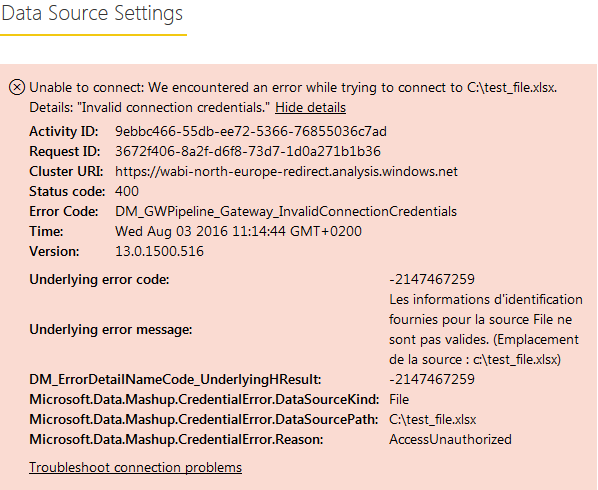
When I try to create a new data source, I get the following error message:


Capture.PNG

Everything was going fine until then.


Any idea on what could be wrong?


1 ACCEPTED SOLUTION
Anonymous
Not applicable

Hi @Clipo,

The above error could occur when you enter incorrect Windows username and password.

Please check the current account (Control Panel>User Accounts>User Accounts) in your machine, use this account which is under your display name as Windows username and check if you can add data source successfully.

Additionally, if you use O365 credential to sign into your machine, please use 'AzureAD\O365 name' as Windows username and then use O365 password as the Windows password. For more details, please review this similar thread.

Thanks,
Lydia Zhang

View solution in original post

2 REPLIES 2
Anonymous
Not applicable

Hi @Clipo,

The above error could occur when you enter incorrect Windows username and password.

Please check the current account (Control Panel>User Accounts>User Accounts) in your machine, use this account which is under your display name as Windows username and check if you can add data source successfully.

Additionally, if you use O365 credential to sign into your machine, please use 'AzureAD\O365 name' as Windows username and then use O365 password as the Windows password. For more details, please review this similar thread.

Thanks,
Lydia Zhang

Hello Lydia,


Problem solved.

I was indeed not using the correct username.


Thank you for your help!

Helpful resources

Announcements
Fabric Data Days is here Carousel

Data Days 2026

Don't miss out on Data Days, June 15 through August 7. Learn Fabric, Power BI, SQL, AI and more.

Power BI DataViz World Championships carousel

Power BI DataViz World Championships - June 2026

A new Power BI DataViz World Championship is coming this June! Don't miss out on submitting your entry.