I'm trying to use an excel file (on sharepoint) with a list of Segment IDs as input to a function in a Dataflow (as per in this video).
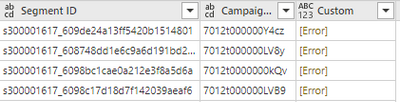
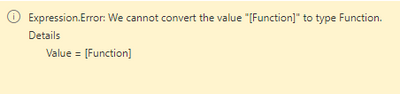
All works until I get to the stage where I "Invoke Custom Function", and the column returns an error. I don't know enough to decipher the error unfortunately.
let
  Source = SharePoint.Files("https://mycompany.sharepoint.com/sites/CentralMarketingTeam", [ApiVersion = 15]),
  #"Filtered rows" = Table.SelectRows(Source, each [Folder Path] = "https://mycompany.sharepoint.com/sites/CentralMarketingTeam/Data Vault/Web Pages and Segments/" and [Name] = "Campaign Web Pages and Segments.xlsx"),
  #"Filtered hidden files" = Table.SelectRows(#"Filtered rows", each [Attributes]?[Hidden]? <> true),
  #"Invoke custom function" = Table.AddColumn(#"Filtered hidden files", "Transform file", each #"Transform file"([Content])),
  #"Renamed columns" = Table.RenameColumns(#"Invoke custom function", {{"Name", "Source.Name"}}),
  #"Removed other columns" = Table.SelectColumns(#"Renamed columns", {"Source.Name", "Transform file"}),
  #"Expanded table column" = Table.ExpandTableColumn(#"Removed other columns", "Transform file", Table.ColumnNames(#"Transform file"(#"Sample file"))),
  #"Changed column type" = Table.TransformColumnTypes(#"Expanded table column", {{"Source.Name", type text}, {"Segment Name", type text}, {"Segment ID", type text}, {"Campaign ID", type text}}),
  #"Removed columns" = Table.RemoveColumns(#"Changed column type", {"Source.Name"}),
  #"Invoked custom function" = Table.AddColumn(#"Removed columns", "Custom", each GetCampaignSegmentIDs([Segment ID]))
in
  #"Invoked custom function"


