cancel
Showing results for 
Search instead for 
Did you mean: 

The Power BI Data Visualization World Championships is back! Get ahead of the game and start preparing now! Learn more

Reply
pmaviles
Frequent Visitor

Incremental Refresh - Detect Data Changes

We're testing out the capabilities that Power BI's incremental refresh has; specifically we're working to understand the detect data changes option and we're running into a few snags. There are two questions that have me beating my head against a wall.


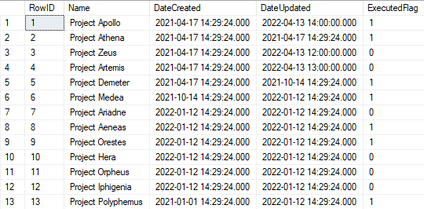
I've got a test table I'm using just to mess with detect data changes. I've set up incremental refresh and am partitioning on DateCreated and detecting data changes using DateUpdated. This has been published to the service and that's where my issues are. I know partitions are created and max date within each partition is stored and then every refresh operation those dates are compared to the max of each partition and that's what determines whether or not a partition needs to be refreshed.
pmaviles_0-1649878999040.png


First issue:

I've set up scheduled refreshes throughout the day and I've also manually refreshed the dataset, but the report visual I have doesn't seem to update. For example, Project Zeus had a DateUpdated of 04/17/2021, we updated it to 04/13/2022, and refreshed the dataset in the Power BI service, but the report visual still showed 04/17/2021. Is there a step I'm missing here?


Second issue/question:

A question was brought up about the partitions themselves, if for some reason a date was entered incorrectly is there a way to retroactively update the partitions? Since the partitions are created behind the scenes we figured the partitions might retroactively change, but when we updated a Date Created from 01/12/2022 to 01/01/2021 the record was still counted in its original partition. Of course, with a "Date Created" column we shouldn't be changing dates, but just wanted to ask the question to understand the principle behind it.


If any more info is needed to better understand/better answer please let me know.

1 ACCEPTED SOLUTION
v-chenwuz-msft
Community Support
Community Support

Hi @pmaviles ,


First:

Incremental refreshing is refreshing the data according to the rules you define.
The first parameter refreshes that table.
The second parameter how long this table keeps data for the span
The third refreshes every few days. If you enable the get the last data with direct query feature, you can query the latest data in real time even if it is not refreshed.

So in your example, you can disable the get the last data with direct query feature.

Configure incremental refresh and real-time data for Power BI datasets - Power BI | Microsoft Docs


Second:

You can read this article below to get a closer look at the process of incremental refresh and the partition settings. 

Advanced incremental refresh and real-time data with the XMLA endpoint in Power BI - Power BI | Micr...

Power BI Premium also enables more advanced partition and refresh scenarios through the XMLA endpoint.


Best Regards

Community Support Team _ chenwu zhu


If this post helps, then please consider Accept it as the solution to help the other members find it more quickly.

View solution in original post

1 REPLY 1
v-chenwuz-msft
Community Support
Community Support

Hi @pmaviles ,


First:

Incremental refreshing is refreshing the data according to the rules you define.
The first parameter refreshes that table.
The second parameter how long this table keeps data for the span
The third refreshes every few days. If you enable the get the last data with direct query feature, you can query the latest data in real time even if it is not refreshed.

So in your example, you can disable the get the last data with direct query feature.

Configure incremental refresh and real-time data for Power BI datasets - Power BI | Microsoft Docs


Second:

You can read this article below to get a closer look at the process of incremental refresh and the partition settings. 

Advanced incremental refresh and real-time data with the XMLA endpoint in Power BI - Power BI | Micr...

Power BI Premium also enables more advanced partition and refresh scenarios through the XMLA endpoint.


Best Regards

Community Support Team _ chenwu zhu


If this post helps, then please consider Accept it as the solution to help the other members find it more quickly.

Helpful resources

Announcements
Power BI DataViz World Championships

Power BI Dataviz World Championships

The Power BI Data Visualization World Championships is back! Get ahead of the game and start preparing now!

December 2025 Power BI Update Carousel

Power BI Monthly Update - December 2025

Check out the December 2025 Power BI Holiday Recap!

FabCon Atlanta 2026 carousel

FabCon Atlanta 2026

Join us at FabCon Atlanta, March 16-20, for the ultimate Fabric, Power BI, AI and SQL community-led event. Save $200 with code FABCOMM.