Don't miss your chance to take the Fabric Data Engineer (DP-600) exam for FREE! Find out how by watching the DP-600 session on-demand now through April 28th.
Learn moreJoin the FabCon + SQLCon recap series. Up next: Power BI, Real-Time Intelligence, IQ and AI, and Data Factory take center stage. All sessions are available on-demand after the live show. Register now
Hi
After setting Incremental Refresh in Desktop with in power query ,
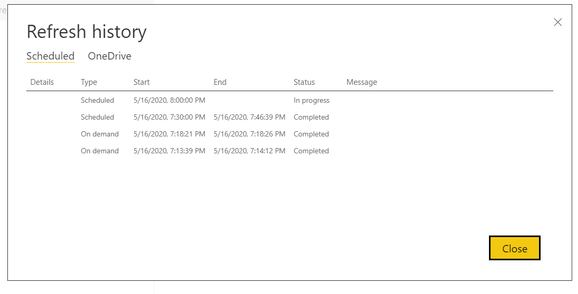
I see the below screenshot in power bi service ,
how to trace why the incremental refresh is not happening in scheduled refresh case.?? while first time on demand 1 , ondemand 2 seems have achieved incremental refresh.
Please help me with the above how to trace or find solution for this.
Solved! Go to Solution.
Hi @PowerAnu
You can check your local gateway log or use fiddler to trace the operation logs.
Reference link:
Troubleshooting Power BI Gateway - Personal
Fiddler is a free tool from Telerik that monitors HTTP traffic. You can see the back and forth with the Power BI service from the client machine. This may show errors and other related information.
If the Personal Gateway, fails to install, you will see a link to show the setup log. This could show you details about the failure. These are Windows Install logs, or also knows as MSI logs. They can be fairly complex and hard to read. Typically the resulting error will be at the bottom, but determining the cause of the error is not trivial. It could be a result of errors in a different log, or be a result of an error higher up in the log.
Alternatively, you can go to your Temp folder (%temp%) and look for files that start with Power_BI_.
Going to %temp% may take you to a subfolder of temp. The Power_BI_ files will be in the root of the temp directory. You may need to go up a level or two.
Hi @PowerAnu
You can check your local gateway log or use fiddler to trace the operation logs.
Reference link:
Troubleshooting Power BI Gateway - Personal
Fiddler is a free tool from Telerik that monitors HTTP traffic. You can see the back and forth with the Power BI service from the client machine. This may show errors and other related information.
If the Personal Gateway, fails to install, you will see a link to show the setup log. This could show you details about the failure. These are Windows Install logs, or also knows as MSI logs. They can be fairly complex and hard to read. Typically the resulting error will be at the bottom, but determining the cause of the error is not trivial. It could be a result of errors in a different log, or be a result of an error higher up in the log.
Alternatively, you can go to your Temp folder (%temp%) and look for files that start with Power_BI_.
Going to %temp% may take you to a subfolder of temp. The Power_BI_ files will be in the root of the temp directory. You may need to go up a level or two.
Sql server as a data source supports query folding , can see native query at each step.
Check out the April 2026 Power BI update to learn about new features.
If you have recently started exploring Fabric, we'd love to hear how it's going. Your feedback can help with product improvements.
A new Power BI DataViz World Championship is coming this June! Don't miss out on submitting your entry.
| User | Count |
|---|---|
| 9 | |
| 8 | |
| 8 | |
| 8 | |
| 7 |
| User | Count |
|---|---|
| 38 | |
| 30 | |
| 26 | |
| 22 | |
| 19 |