cancel
Showing results for 
Search instead for 
Did you mean: 

The Power BI Data Visualization World Championships is back! Get ahead of the game and start preparing now! Learn more

Reply
inaryboy
New Member

Incorrect Data being pulled from Excel Spreedsheet in OneDrive

Hi,


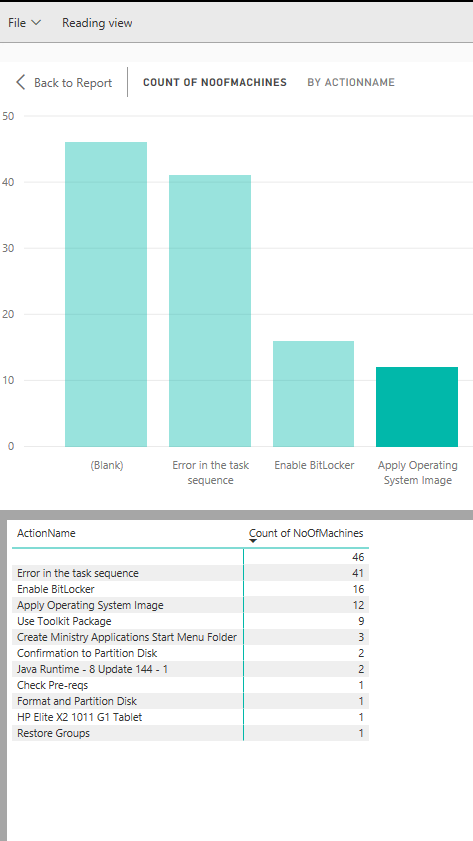
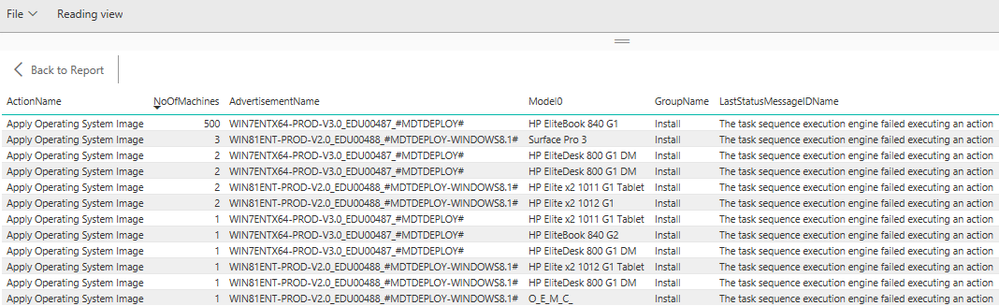
I am seeing incorrect data in the BI Report.  I updated a field in Excel to 500 but it is not being updated in the report.  I tried deleting everything including the report the spreadsheet and recreating it from scratch but the data is still incorrect.  It is like the data is either being cached or filtered.  When I right click on one of the bar graphs and select "See Records".  It shows the 500 value (see bottom image).


Is there something I am missing or is this a bug?


BIData.pngRecords.png

1 ACCEPTED SOLUTION
inaryboy
New Member

Hi Qiuyun Yu,


Thank you for your reply.


I found the problem.  Power BI was using COUNT as the default grouping method, in Excel when I use the same table it defaults to SUM.


The data look good now.


Thank you and appreciate your time.


Regards,


View solution in original post

3 REPLIES 3
v-qiuyu-msft
Community Support
Community Support

Hi @inaryboy,


Glad to hear the issue is gone now Smiley Happy.


As the data is fine now, I will close this thread. 


Best Regards,
Qiuyun Yu 

Community Support Team _ Qiuyun Yu
If this post helps, then please consider Accept it as the solution to help the other members find it more quickly.
inaryboy
New Member

Hi Qiuyun Yu,


Thank you for your reply.


I found the problem.  Power BI was using COUNT as the default grouping method, in Excel when I use the same table it defaults to SUM.


The data look good now.


Thank you and appreciate your time.


Regards,


v-qiuyu-msft
Community Support
Community Support

Hi @inaryboy,


As the 500 displays in See Records, it means the dataset already updated. How do you find the 500 not updated in the report? 


Please enter Edit mode of the report, then add a table visual, drag the ActionName and NoOfMachines columns into the table visual. then sort the NoOfMachines column descending, to check if 500 is here. 


Best Regards,
Qiuyun Yu 

Community Support Team _ Qiuyun Yu
If this post helps, then please consider Accept it as the solution to help the other members find it more quickly.

Helpful resources

Announcements
Power BI DataViz World Championships

Power BI Dataviz World Championships

The Power BI Data Visualization World Championships is back! Get ahead of the game and start preparing now!

November Power BI Update Carousel

Power BI Monthly Update - November 2025

Check out the November 2025 Power BI update to learn about new features.

FabCon Atlanta 2026 carousel

FabCon Atlanta 2026

Join us at FabCon Atlanta, March 16-20, for the ultimate Fabric, Power BI, AI and SQL community-led event. Save $200 with code FABCOMM.