This time we’re going bigger than ever. Fabric, Power BI, SQL, AI and more. We're covering it all. You won't want to miss it.
Learn moreDid you hear? There's a new SQL AI Developer certification (DP-800). Start preparing now and be one of the first to get certified. Register now
We're getting inconsistant availability for the PowerBI Addmin in Powerpoint between users. A number of users have access to the addin, but others dont.
- Its enabled in the Admin Portal of PowerBI
- Users are added to the PowerBI addin in Azure
The only requirements listed seem to be here;
Power BI add-in for PowerPoint - Admin info - Power BI | Microsoft Learn
....and both requirements are fullfilled;
"To use the Power BI add-in for PowerPoint, users must either have access to the Office add-in store, or the add-in must be made available to them as an admin managed add-in.
In national clouds, the add-in must be deployed as an admin managed add-in, since the Office add-in store isn't accessible from national clouds. For more information, see Deploying the add-in in national clouds."
Are there other prerequisites that the documentation just assumes?
Of course there is. In PowerPoint, each user must enable the "Live services" feature.
My appologies if it was so simple, imagine I have no clue what you're referring to, what do you mean by the 'live services' feature in Powerpoint.
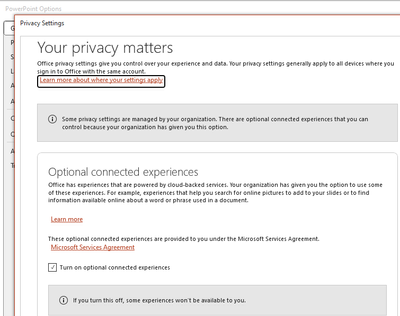
No need to apologize, I was trying to be sarcastic. If the below setting is off then nothing will work.
Ah I see, I can confirm that this setting is set to on, for all users whether it works or not. I've also checked the version number, and we have users on 2303, which it works for, 2303 which it doesn't, and I'm on 2304, which it works.
Check out the April 2026 Power BI update to learn about new features.
Sign up to receive a private message when registration opens and key events begin.
If you have recently started exploring Fabric, we'd love to hear how it's going. Your feedback can help with product improvements.
| User | Count |
|---|---|
| 10 | |
| 8 | |
| 8 | |
| 8 | |
| 7 |
| User | Count |
|---|---|
| 49 | |
| 27 | |
| 24 | |
| 20 | |
| 20 |