Join us at FabCon Atlanta from March 16 - 20, 2026, for the ultimate Fabric, Power BI, AI and SQL community-led event. Save $200 with code FABCOMM.
Register now!Get Fabric Certified for FREE during Fabric Data Days. Don't miss your chance! Request now
Hi all,
lately I noticed that the created teams are showing up on the power bi workspace section and wanted to test by creating a team using the power bi workspace under the office 365 option and later I deleted that team which deleted my power bi workspace as well.
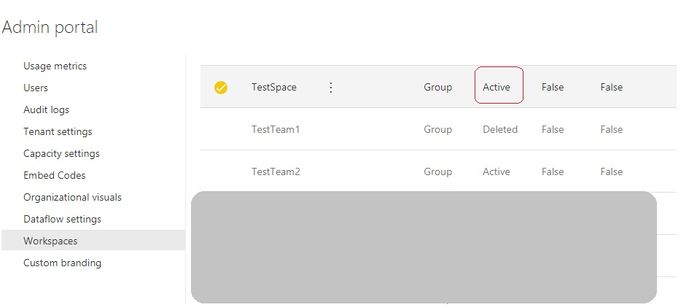
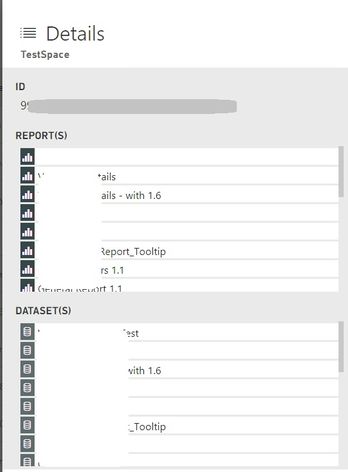
Now when I looked into the Power BI admin portal, it shows that the workspace still exists along with the reports and datasets in it and not deleted. I tried to access using the ID but no luck.
Workspace is active (not deleted)
Details shows the files in it unlike the deleted workspaces
Does anyone know how to recover the workspace back into the power bi or access/recover the reports and datasets in it!
And also is anyone else experiencing the same annoyance of seeing teams into power bi as workspaces?
Any help would be much appreciated.
Thanks,
k3rz0rg
Solved! Go to Solution.
Hi there
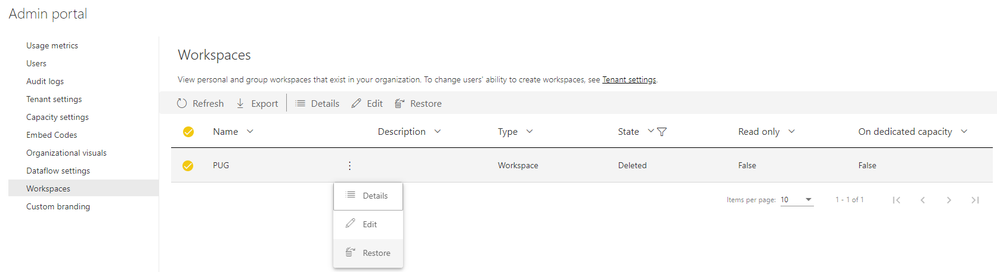
You can go into the Admin Portal, and then click on Workspaces
As shown below you can then search for your Deleted Workspace and Restore it
Hi there
You can go into the Admin Portal, and then click on Workspaces
As shown below you can then search for your Deleted Workspace and Restore it
Hi @GilbertQ , very surprisingly neither me nor my O365 admin sees the option for the restoration! All we can see the details which shows the list of reports and list of datasets in it and accessing with the workspace id in the link tells all of us that we are not authorized to access the workspace (smh)...
-K3
Have you tried using the powershell script as described?
You will need your id, workspacename, and Admin email to restore.
PS C:\> Restore-PowerBIWorkspace -Id "3244f1c1-01cf-457f-9383-6035e4950fdc" -RestoredName "TestWorkspace" -AdminEmailAddress "john@contoso.com"
Check out the November 2025 Power BI update to learn about new features.
Advance your Data & AI career with 50 days of live learning, contests, hands-on challenges, study groups & certifications and more!