cancel
Showing results for 
Search instead for 
Did you mean: 

Get Fabric Certified for FREE during Fabric Data Days. Don't miss your chance! Request now

Reply
Anonymous
Not applicable

How to make the date slicer interactive with other slicer

Hi all,

I have few slicers in my report.

Capture.JPG


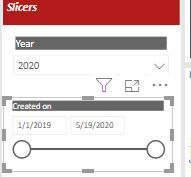
The "year" slicers is selected as 2020, but the "created on" slicer is showing the start date as the inital date from the model and the end date as todays date.


Is there a way to control the created on slicer to interact with the year slicer as showing different dates in the created on slicer is misleading.


Thank you

Poojitha

1 ACCEPTED SOLUTION
nandukrishnavs
Community Champion
Community Champion

@Anonymous 


I assume that there is a direct relationship with these two columns.


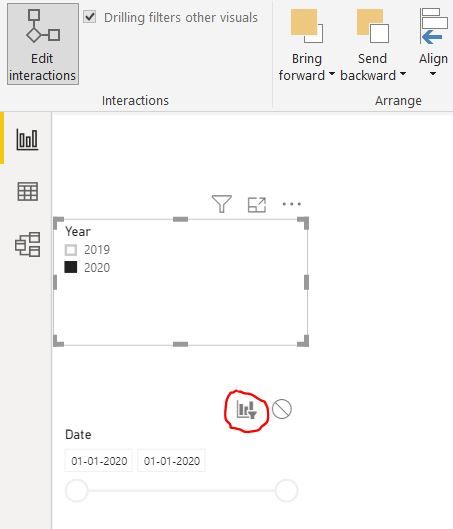
You can enable the visual interaction for slicers.

Capture.JPG

https://docs.microsoft.com/en-us/power-bi/create-reports/service-reports-visual-interactions


Did I answer your question? Mark my post as a solution!
Appreciate with a kudos
🙂


Regards,
Nandu Krishna

View solution in original post

1 REPLY 1
nandukrishnavs
Community Champion
Community Champion

@Anonymous 


I assume that there is a direct relationship with these two columns.


You can enable the visual interaction for slicers.

Capture.JPG

https://docs.microsoft.com/en-us/power-bi/create-reports/service-reports-visual-interactions


Did I answer your question? Mark my post as a solution!
Appreciate with a kudos
🙂


Regards,
Nandu Krishna

Helpful resources

Announcements
November Power BI Update Carousel

Power BI Monthly Update - November 2025

Check out the November 2025 Power BI update to learn about new features.

Fabric Data Days Carousel

Fabric Data Days

Advance your Data & AI career with 50 days of live learning, contests, hands-on challenges, study groups & certifications and more!

FabCon Atlanta 2026 carousel

FabCon Atlanta 2026

Join us at FabCon Atlanta, March 16-20, for the ultimate Fabric, Power BI, AI and SQL community-led event. Save $200 with code FABCOMM.

Top Solution Authors
Top Kudoed Authors