cancel
Showing results for 
Search instead for 
Did you mean: 

Level up your Power BI skills this month - build one visual each week and tell better stories with data! Get started

Reply
Kandarp
Helper I
Helper I

How to interpret automatic aggregation training graph

Hi,


I am using direct query in my power bi report. I came to know about dataset feature called Automatic aggregations training. In my dataset I have enabled this feature to cache the queries and speed up the performance. 

My question is I am not able to interpret the chart provided by power bi service.I have gone through all the articles available but still I do not understand what the chart is trying to say. I need help in understading the chart whether aggregation is working positively or negatively in my dataset. I have attached the screenshot of my dataset's chart.Kandarp_0-1679461191109.png


1 ACCEPTED SOLUTION
v-yueyunzh-msft
Community Support
Community Support

Hi , @Kandarp

According to your description, you want to to know the "automatic aggregation training graph".

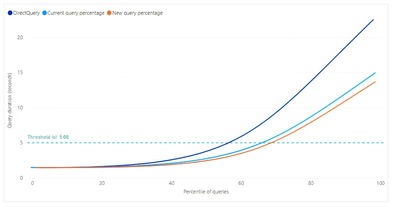
The Query performance impact lift chart provides estimated report query run times as a function of the percentage of queries that will use cached aggregations.

The chart can help you determine if adjusting the percentage of queries that use the in-memory aggregations cache can potentially further improve query response.
vyueyunzhmsft_0-1679630283969.png

Threshold appears as a marker line on the lift chart and indicates the target query response time for your reports. You can then fine-tune the percentage of queries that will use the aggregations cache to determine a new query percentage that meets the desired threshold.


DirectQuery : An estimated duration in seconds for a report query sent to and returned from the data source by using DirectQuery. Queries that can't be answered by the in-memory aggregations cache will typically be within this estimate.

Current query percentage : An estimated duration in seconds for report queries answered from the in-memory aggregations cache, based on the percentage setting for the most recent training/refresh operation.

New query percentage :An estimated duration in seconds for report queries answered from the in-memory aggregations cache for the newly selected percentage. As the percentage slider is changed, this metric reflects the potential change.

As I understand it, the main function of this icon is to design a threshold for your expected query time, and then adjust the different percentages of queries to get the fastest new query percentage.


Best Regards,

Aniya Zhang

If this post helps, then please consider Accept it as the solution to help the other members find it more quickly


View solution in original post

1 REPLY 1
v-yueyunzh-msft
Community Support
Community Support

Hi , @Kandarp

According to your description, you want to to know the "automatic aggregation training graph".

The Query performance impact lift chart provides estimated report query run times as a function of the percentage of queries that will use cached aggregations.

The chart can help you determine if adjusting the percentage of queries that use the in-memory aggregations cache can potentially further improve query response.

vyueyunzhmsft_0-1679630283969.png

Threshold appears as a marker line on the lift chart and indicates the target query response time for your reports. You can then fine-tune the percentage of queries that will use the aggregations cache to determine a new query percentage that meets the desired threshold.


DirectQuery : An estimated duration in seconds for a report query sent to and returned from the data source by using DirectQuery. Queries that can't be answered by the in-memory aggregations cache will typically be within this estimate.

Current query percentage : An estimated duration in seconds for report queries answered from the in-memory aggregations cache, based on the percentage setting for the most recent training/refresh operation.

New query percentage :An estimated duration in seconds for report queries answered from the in-memory aggregations cache for the newly selected percentage. As the percentage slider is changed, this metric reflects the potential change.

As I understand it, the main function of this icon is to design a threshold for your expected query time, and then adjust the different percentages of queries to get the fastest new query percentage.


Best Regards,

Aniya Zhang

If this post helps, then please consider Accept it as the solution to help the other members find it more quickly


Helpful resources

Announcements
April Power BI Update Carousel

Power BI Monthly Update - April 2026

Check out the April 2026 Power BI update to learn about new features.

Fabric SQL PBI Data Days

Data Days 2026 coming soon!

Sign up to receive a private message when registration opens and key events begin.

New to Fabric survey Carousel

New to Fabric Survey

If you have recently started exploring Fabric, we'd love to hear how it's going. Your feedback can help with product improvements.

Power BI DataViz World Championships carousel

Power BI DataViz World Championships - June 2026

A new Power BI DataViz World Championship is coming this June! Don't miss out on submitting your entry.