cancel
Showing results for 
Search instead for 
Did you mean: 

The Power BI Data Visualization World Championships is back! Get ahead of the game and start preparing now! Learn more

Reply
Anonymous
Not applicable

How to deploy Azure SQL database credentials with the model using the tabular editor?

I would like to know if it possible to deploy Azure SQL database credentials to the powerbi service using the tabular editor? I don't want to add those credentials to each datasource manually.

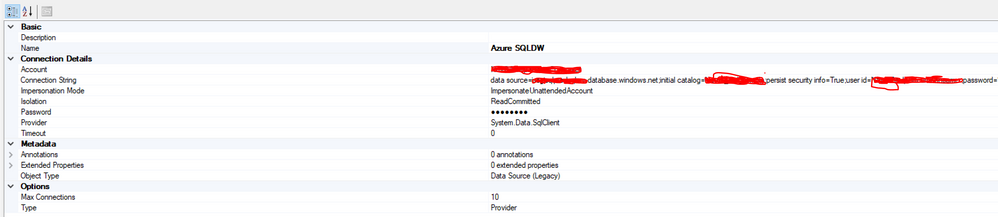
I've created a basic model using the tabular editor with a legacy datasource that looks like this:

tab.PNG

I can connect to the datasource in the tabular editor and import tables, but when it comes to the model deployment, I get an error in the powerbi service that the imported datasource doesn't contain credentials to access the database. I tried different impersonation modes, but without success.

1 ACCEPTED SOLUTION
Anonymous
Not applicable

2 REPLIES 2
Anonymous
Not applicable

Datasets - Update Datasources (Power BI Power BI REST APIs) | Microsoft Docs Added a step to my pipeline for patching the datasource

nickyvv
Most Valuable Professional

You'll have to set the credentials (once) in the service.

It can be done programmatically however, for example with the REST API, I believe this one will do.


Did I answer your question? Mark my post as a solution!

Blog: nickyvv.com | @NickyvV


Helpful resources

Announcements
Power BI DataViz World Championships

Power BI Dataviz World Championships

The Power BI Data Visualization World Championships is back! Get ahead of the game and start preparing now!

December 2025 Power BI Update Carousel

Power BI Monthly Update - December 2025

Check out the December 2025 Power BI Holiday Recap!

FabCon Atlanta 2026 carousel

FabCon Atlanta 2026

Join us at FabCon Atlanta, March 16-20, for the ultimate Fabric, Power BI, AI and SQL community-led event. Save $200 with code FABCOMM.