Advance your Data & AI career with 50 days of live learning, dataviz contests, hands-on challenges, study groups & certifications and more!
Get registeredGet Fabric Certified for FREE during Fabric Data Days. Don't miss your chance! Request now
I selected to Publish to web for a report recently just because I wanted to see how it worked. Just too easy. Its great.
However, now I want to "unpublish" that report or remove access for anyone outside my organization until I am granted approval. How would I unpublish a report from the web?
Note, there is only test data in it now, so not a big deal for the time being.
Thank you,
Solved! Go to Solution.
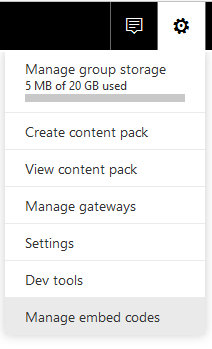
@ttinsley Click on Settings (Wheel on upper right) -> Manage Embed codes
You can delete any code you've generated from there.
Hi,
You can move your mouse upper right, and click “Manage embed codes”.
Then find your report and click “…”
Click “delete” , then your report will be unpublished from web.
Best Regards
Alex
Hi,
You can move your mouse upper right, and click “Manage embed codes”.
Then find your report and click “…”
Click “delete” , then your report will be unpublished from web.
Best Regards
Alex
Thank you both very much
@ttinsley Click on Settings (Wheel on upper right) -> Manage Embed codes
You can delete any code you've generated from there.
Advance your Data & AI career with 50 days of live learning, contests, hands-on challenges, study groups & certifications and more!
Check out the October 2025 Power BI update to learn about new features.
| User | Count |
|---|---|
| 52 | |
| 23 | |
| 12 | |
| 11 | |
| 11 |