cancel
Showing results for 
Search instead for 
Did you mean: 

Data Days is here! Join us now for 60+ days of learning, challenges, and connection. Learn more

Reply
CoboleiroBr
Helper I
Helper I

Help using Flow

Hello guys!


Anyone used Flow to refresh a dataset in Power BI?


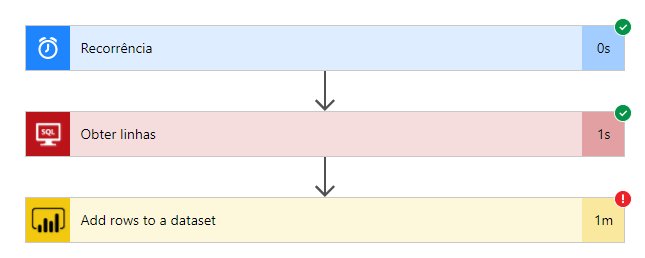
I've created a new flow using a recurrent time (each 5 minutes), to get rows in SQL Server and update a dataset in Power BI, this way:

Flow1.png


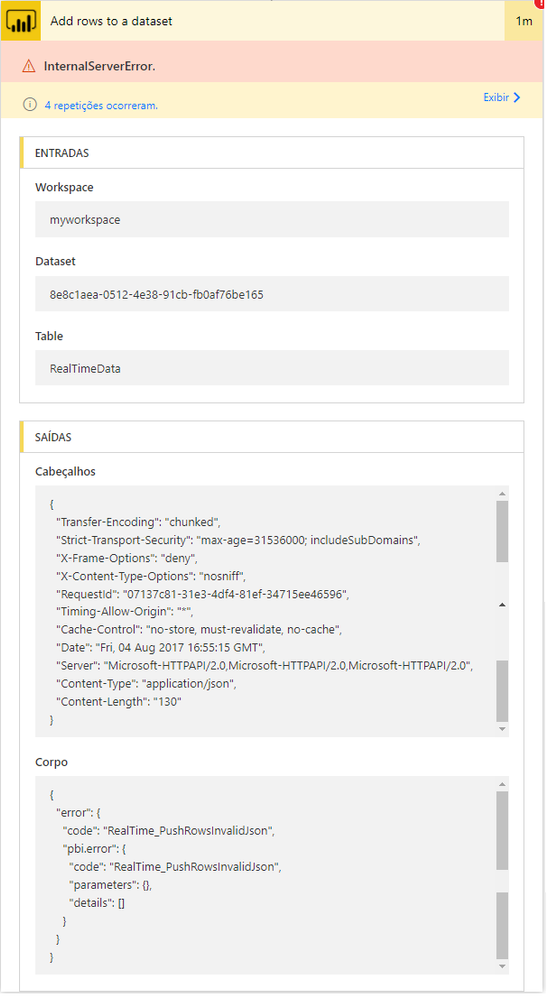
Everything ok in the first two steps, but when adding lines to a dataset I got an error.


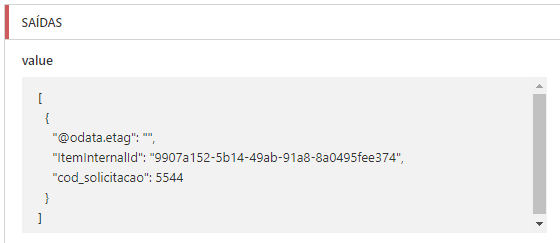
JSON output:Flow2.png


Error:Flow3.png


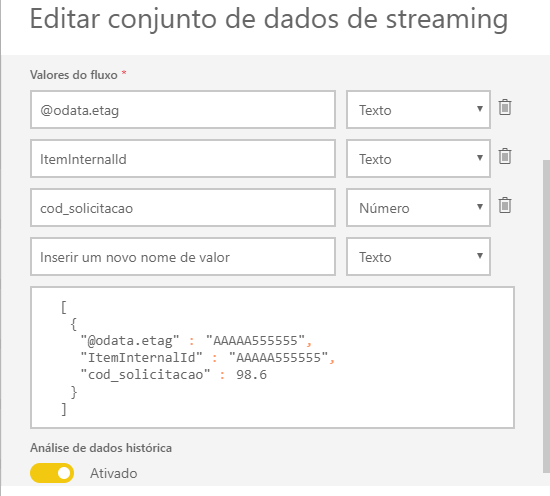
My dataset in PowerBI:Flow4.png


Observation: I'm getting only the column "cod_solicitacao" from the table, but how the output written these two other columns, I put them in the dataset definition, but I got the same error.


Any tips?


Thanks!


1 ACCEPTED SOLUTION
CoboleiroBr
Helper I
Helper I

@v-jiascu-msft and @GilbertQ, thanks for your answers!


This was my first time testing Flow and I had not associated the selected column to the respective field in the dataset.


I found this cool tutorial where I could see where was the problem...

https://www.youtube.com/watch?v=B4dCLtQ53pA


Thanks!

View solution in original post

3 REPLIES 3
CoboleiroBr
Helper I
Helper I

@v-jiascu-msft and @GilbertQ, thanks for your answers!


This was my first time testing Flow and I had not associated the selected column to the respective field in the dataset.


I found this cool tutorial where I could see where was the problem...

https://www.youtube.com/watch?v=B4dCLtQ53pA


Thanks!

v-jiascu-msft
Microsoft Employee
Microsoft Employee

Hi @CoboleiroBr,


According to my test, the other two columns will be null if they can't be fetched from the database. Maybe you should check the number of the fields of your table and the dataset as @GilbertQ said. 


Best Regards!

Dale

Community Support Team _ Dale
If this post helps, then please consider Accept it as the solution to help the other members find it more quickly.
GilbertQ
Super User
Super User

Hi @CoboleiroBr


The first thing that I would ask is to ensure that the data types from SQL Server and then after you modify the data are the same as what is set in your Streaming data set?


Then it appears in your image that there are possibly 4 columns whilst in the json below it only has 3 rows.


Did I answer your question? Mark my post as a solution!

Proud to be a Super User!


Power BI Blog

Helpful resources

Announcements
Fabric Data Days is here Carousel

Fabric Data Days 2026

Don't miss out on Data Days, June 15 through August 7. Learn Fabric, Power BI, SQL, AI and more.

May Power BI Update Carousel

Power BI Monthly Update - May 2026

Check out the May 2026 Power BI update to learn about new features.

Power BI DataViz World Championships carousel

Power BI DataViz World Championships - June 2026

A new Power BI DataViz World Championship is coming this June! Don't miss out on submitting your entry.