cancel
Showing results for 
Search instead for 
Did you mean: 

Get Fabric Certified for FREE during Fabric Data Days. Don't miss your chance! Request now

Reply
arock-well
Responsive Resident
Responsive Resident

Have "Save a Copy" overwrite an existing report

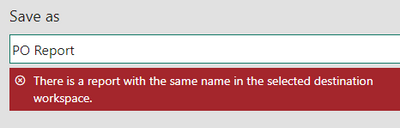
I have reports from various workspaces where I send a copy of the report to a dedicated Multiple Audience App workspace. However, when I use "Save a Copy" to do this it doesn't allow me to replace or overwrite the existing report in the Multiple Audience App. 


arockwell_2-1674753414057.png


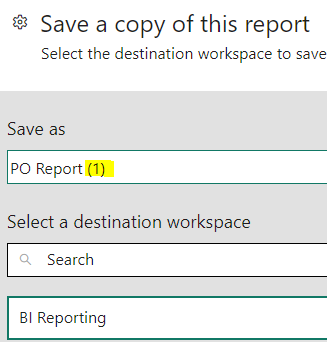
In this example, there is a report called "PO Report" I'm wanting to copy over that is already in the "BI Reporting" Multiple Audience App. Instead of giving me the option to override it, it places a (1) at the end to save a separate copy.

arockwell_0-1674752879067.png


I want it to overwrite because I don't want to have to reset the permissions and other settings everytime there is an update. Plus, because it is considered a new report, people who have linked to the original one will have those broken now.


Is there a way to do this? Is there a reason why this can't be an option?

4 REPLIES 4
axkuu
Frequent Visitor

Yes. This would save a ton of time.


Use case: We have multiple workspaces. Each workspace has an app and a report which is a copy of the main report (linked to main dataset)


The process now is:

Update dataset and report in the main workspace

Copy report from main to client workspaces under new name (<< because we cannot overwrite report!)

Go to each workspace and:

  • Go to Update app
  • Remove the old report from app
  • Add new copy to app
  • Rename "copy" menu back to normal
  • Update app

We have to do this EVERY time we need to update report for EACH workspace.


I know in some cases it is possible to use only one app, but due to styling, app naming we have to use separate apps.


At least with app the link stays the same for the users.


IDEALLY it would be best to have a "UPDATE COPIES WITH CURRENT VERSION" function. i.e.

  • Press "Update report copies"
  • Select which copies to update (with workspace info)
  • Click Update and all copies are synced with the source
arock-well
Responsive Resident
Responsive Resident

If you haven't already, please vote for this feature request:  Have a "Save a Copy" option to overwrite an existing report 

arock-well
Responsive Resident
Responsive Resident

Unless anyone has a solution or workaround, I'm starting to think this is a new feature request. Now I have to rethink how I'm using Multiple Audience Apps. 

Helpful resources

Announcements
November Power BI Update Carousel

Power BI Monthly Update - November 2025

Check out the November 2025 Power BI update to learn about new features.

Fabric Data Days Carousel

Fabric Data Days

Advance your Data & AI career with 50 days of live learning, contests, hands-on challenges, study groups & certifications and more!

FabCon Atlanta 2026 carousel

FabCon Atlanta 2026

Join us at FabCon Atlanta, March 16-20, for the ultimate Fabric, Power BI, AI and SQL community-led event. Save $200 with code FABCOMM.

Top Solution Authors
Top Kudoed Authors