cancel
Showing results for 
Search instead for 
Did you mean: 

Learn from the best! Meet the four finalists headed to the FINALS of the Power BI Dataviz World Championships! Register now

Reply
Renco
Advocate II
Advocate II

Get Data functionality (Apps, AppSource)

Hi everyone,


I'm facing an issue with the Power BI service for quite some time now.

I Have created several workspaces and apps with reports and dashboards and shared the apps within the entire organisation.

When a colleague tries to download one of those apps, they are not always available on Appsource. Let me explain two different approaches where with one the issue persists and with the other everything works fine:


Issue persists: 

- Logged in to the Power BI Service

- In the bottom left > click 'Get Data'

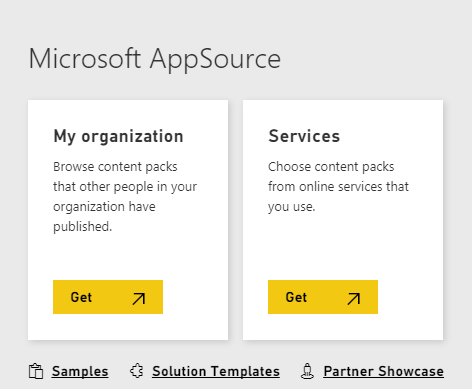
- Under Microsoft AppSource > My organisation > click "Get"

- AppSource is loading and NOT showing my published apps, even though I have access for it


And this works

- Logged in to the Power BI Service

- In the left navigation pane > click "Apps"

- Here you get an overview of your current apps. Next to your last app there is an, somewhat greyed out, option to get more apps > click this option. Called: 'Get more apps from Microsoft Appsource

- AppSource is loading and showing all of my published apps.


Can someone please explain what the difference is between those approaches and why one is showing correctly and the other does not? 

1 ACCEPTED SOLUTION
Anonymous
Not applicable

Hi @Renco,


When you use 'get data' option, power bi will get the content pack list.

1.PNG


Content pack is different from power bi app, you can refer to below links to know more about them:

Create and distribute apps with dashboards and reports in Power BI

diiference in content packs and apps


Regards,

Xiaoxin Sheng

View solution in original post

1 REPLY 1
Anonymous
Not applicable

Hi @Renco,


When you use 'get data' option, power bi will get the content pack list.

1.PNG


Content pack is different from power bi app, you can refer to below links to know more about them:

Create and distribute apps with dashboards and reports in Power BI

diiference in content packs and apps


Regards,

Xiaoxin Sheng

Helpful resources

Announcements
Join our Fabric User Panel

Join our Fabric User Panel

Share feedback directly with Fabric product managers, participate in targeted research studies and influence the Fabric roadmap.

March Power BI Update Carousel

Power BI Community Update - March 2026

Check out the March 2026 Power BI update to learn about new features.