Don't miss your chance to take the Fabric Data Engineer (DP-600) exam for FREE! Find out how by attending the DP-600 session on April 23rd (pacific time), live or on-demand.
Learn moreNext up in the FabCon + SQLCon recap series: The roadmap for Microsoft SQL and Maximizing Developer experiences in Fabric. All sessions are available on-demand after the live show. Register now
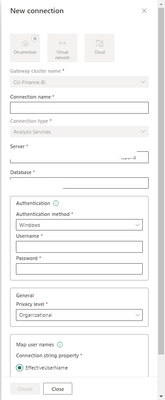
Hi 😋 Sorry. What should be written on these boxes? /Username and password/. I tried so many different ways.
HELP ME PLS
Solved! Go to Solution.
Hi @Anuka ,
when connecting to the data source, in Power Three authication Method Basic, Windows, or OAuth2.
For SQL Server, choose Windows or Basic (SQL Authentication). Enter the credentials for your data source.
If you selected OAuth2 authentication method:
If you selected Windows authentication method, make sure that account has access on the machine. If you're not sure, make sure to add NT-AUTHORITY\Authenticated Users (S-1-5-11) to the local machine Users group.
Or are you using Personal gateway or Standard Gateway ?
If this post helps, then please consider Accepting it as the solution to help the other members find it more quickly.
Hi @Anuka ,
For Connection name.Customization, preferably clarifying the intent of the connection for ease of administrative use.
Server.You can right click on the AS properties in SSMS and find the name.
Database.When you have successfully connected, expand Databases, where the data model name.
Authentication method.Select your connection method and fill in the appropriate credentials.Please note The Windows account you enter must be a member of the Server Administrator role on the Analysis Services instance you're connecting to.
Finally,for map user names.Azure Active Directory (Azure AD) user name map a UPN in your local Active Directory instance.Refer to:Manage SQL Server Analysis Services data sources - Power BI | Microsoft Learn
Hope it helps!
Best regards,
Community Support Team_ Scott Chang
If this post helps then please consider Accept it as the solution to help the other members find it more quickly.
Hi @Anuka ,
For Connection name.Customization, preferably clarifying the intent of the connection for ease of administrative use.
Server.You can right click on the AS properties in SSMS and find the name.
Database.When you have successfully connected, expand Databases, where the data model name.
Authentication method.Select your connection method and fill in the appropriate credentials.Please note The Windows account you enter must be a member of the Server Administrator role on the Analysis Services instance you're connecting to.
Finally,for map user names.Azure Active Directory (Azure AD) user name map a UPN in your local Active Directory instance.Refer to:Manage SQL Server Analysis Services data sources - Power BI | Microsoft Learn
Hope it helps!
Best regards,
Community Support Team_ Scott Chang
If this post helps then please consider Accept it as the solution to help the other members find it more quickly.
Hi @Anuka ,
when connecting to the data source, in Power Three authication Method Basic, Windows, or OAuth2.
For SQL Server, choose Windows or Basic (SQL Authentication). Enter the credentials for your data source.
If you selected OAuth2 authentication method:
If you selected Windows authentication method, make sure that account has access on the machine. If you're not sure, make sure to add NT-AUTHORITY\Authenticated Users (S-1-5-11) to the local machine Users group.
Or are you using Personal gateway or Standard Gateway ?
If this post helps, then please consider Accepting it as the solution to help the other members find it more quickly.
Are you trying to connect to Azure Analysis service or SQL Server analysis service?
Power BI Dataset
If you have recently started exploring Fabric, we'd love to hear how it's going. Your feedback can help with product improvements.
A new Power BI DataViz World Championship is coming this June! Don't miss out on submitting your entry.
Experience the highlights from FabCon & SQLCon, available live and on-demand starting April 14th.
| User | Count |
|---|---|
| 11 | |
| 10 | |
| 9 | |
| 8 | |
| 8 |
| User | Count |
|---|---|
| 33 | |
| 30 | |
| 20 | |
| 17 | |
| 16 |