cancel
Showing results for 
Search instead for 
Did you mean: 

July 7 - July 17 | Round 2 of the Power BI Dataviz World Championships. Don't miss your chance! Learn more

Reply
Anuka
Regular Visitor

Gateway

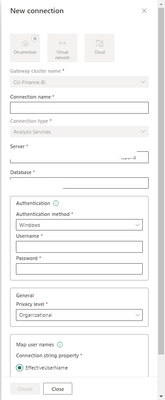
Hi 😋 Sorry. What should be written on these boxes? /Username and password/. I tried so many different ways. 

Anuka_0-1701426663591.png

HELP ME PLS


2 ACCEPTED SOLUTIONS
mohitkumawat
Impactful Individual

Hi @Anuka ,

when connecting to the data source, in Power Three authication Method BasicWindows, or OAuth2.

For SQL Server, choose Windows or Basic (SQL Authentication). Enter the credentials for your data source.

If you selected OAuth2 authentication method:

  • Any query that runs longer than the OAuth token expiration policy may fail.
  • Cross-tenant Azure Active Directory (Azure AD) accounts aren't supported.

If you selected Windows authentication method, make sure that account has access on the machine. If you're not sure, make sure to add NT-AUTHORITY\Authenticated Users (S-1-5-11) to the local machine Users group.

Or are you using Personal gateway or Standard Gateway  ? 
If this post helps, then please consider Accepting it as the solution to help the other members find it more quickly.

View solution in original post

Anonymous
Not applicable

Hi @Anuka ,


For Connection name.Customization, preferably clarifying the intent of the connection for ease of administrative use.

Server.You can right click on the AS properties in SSMS and find the name.

Database.When you have successfully connected, expand Databases, where the data model name.

Authentication method.Select your connection method and fill in the appropriate credentials.Please note The Windows account you enter must be a member of the Server Administrator role on the Analysis Services instance you're connecting to.

Finally,for map user names.Azure Active Directory (Azure AD) user name map a UPN in your local Active Directory instance.Refer to:Manage SQL Server Analysis Services data sources - Power BI | Microsoft Learn


Hope it helps!


Best regards,
Community Support Team_ Scott Chang


If this post helps then please consider Accept it as the solution to help the other members find it more quickly.


View solution in original post

4 REPLIES 4
Anonymous
Not applicable

Hi @Anuka ,


For Connection name.Customization, preferably clarifying the intent of the connection for ease of administrative use.

Server.You can right click on the AS properties in SSMS and find the name.

Database.When you have successfully connected, expand Databases, where the data model name.

Authentication method.Select your connection method and fill in the appropriate credentials.Please note The Windows account you enter must be a member of the Server Administrator role on the Analysis Services instance you're connecting to.

Finally,for map user names.Azure Active Directory (Azure AD) user name map a UPN in your local Active Directory instance.Refer to:Manage SQL Server Analysis Services data sources - Power BI | Microsoft Learn


Hope it helps!


Best regards,
Community Support Team_ Scott Chang


If this post helps then please consider Accept it as the solution to help the other members find it more quickly.


mohitkumawat
Impactful Individual

Hi @Anuka ,

when connecting to the data source, in Power Three authication Method BasicWindows, or OAuth2.

For SQL Server, choose Windows or Basic (SQL Authentication). Enter the credentials for your data source.

If you selected OAuth2 authentication method:

  • Any query that runs longer than the OAuth token expiration policy may fail.
  • Cross-tenant Azure Active Directory (Azure AD) accounts aren't supported.

If you selected Windows authentication method, make sure that account has access on the machine. If you're not sure, make sure to add NT-AUTHORITY\Authenticated Users (S-1-5-11) to the local machine Users group.

Or are you using Personal gateway or Standard Gateway  ? 
If this post helps, then please consider Accepting it as the solution to help the other members find it more quickly.

NandanHegde
Super User
Super User

Are you trying to connect to Azure Analysis service or SQL Server analysis service?


----------------------------------------------------------------------------------------------
Nandan Hegde (MSFT Data MVP)
LinkedIn Profile : www.linkedin.com/in/nandan-hegde-4a195a66
GitHUB Profile : https://github.com/NandanHegde15
Twitter Profile : @nandan_hegde15
MSFT MVP Profile : https://mvp.microsoft.com/en-US/MVP/profile/8977819f-95fb-ed11-8f6d-000d3a560942
Topmate : https://topmate.io/nandan_hegde
Blog :https://datasharkx.wordpress.com

Power BI Dataset

Helpful resources

Announcements
FabCon and SQLCon Barcelona 2026

FabCon & SQLCon – Barcelona 2026

Join us in Barcelona for FabCon and SQLCon, the Fabric, Power BI, SQL, and AI community event. Save €200 with code FABCMTY200.

60 days of Data Days Carousel

Data Days 2026

Join Data Days 2026: 60 days of free live/on-demand sessions, challenges, study groups, and certification opportunities.

Power BI DataViz World Championships carousel

Power BI DataViz World Championships - June 2026

A new Power BI DataViz World Championship is coming this June! Don't miss out on submitting your entry.