Don't miss your chance to take the Fabric Data Engineer (DP-600) exam for FREE! Find out how by watching the DP-600 session on-demand now through April 28th.
Learn moreJoin the FabCon + SQLCon recap series. Up next: Power BI, Real-Time Intelligence, IQ and AI, and Data Factory take center stage. All sessions are available on-demand after the live show. Register now
Hi,
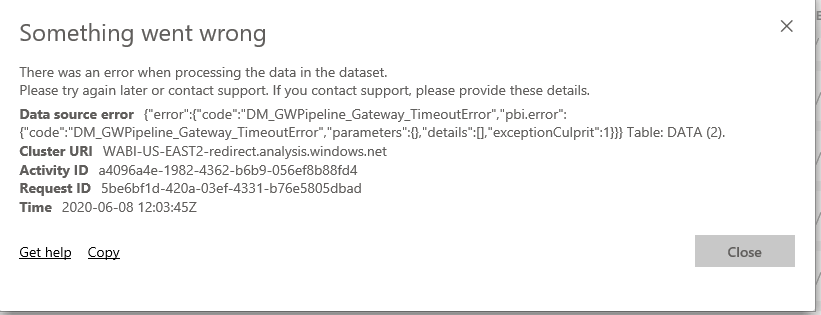
At my company, we have developed a number of PBI reports, the majority of which import their data from a series of Excel sheets on our network drives. All of the reports have been running on the same gateway setup and were working fine until last week when every one of them suddenly started sending me the error message below.
I can manually refresh a few of them in the Desktop app, where the refresh still works, for the time being but it's not ideal. Could there have been too many reports using the same gateway? And even now if I try to use the refresh button on PowerBI.com, it says it timed out after 3-5ish minutes.
Thanks
Hi @theu1996 ,
It seems to be a timeout error... Please check if the solutions in the following threads can help you solve problem:
How to set command timeout option
In addition, if the data model is very complexity or the size of dataset is very large, it will cause timeout error. So please try to optimize the data model and reduce the size of dataset.
Best Regards
Rena
Facing Same problem.
Check out the April 2026 Power BI update to learn about new features.
If you have recently started exploring Fabric, we'd love to hear how it's going. Your feedback can help with product improvements.
A new Power BI DataViz World Championship is coming this June! Don't miss out on submitting your entry.
| User | Count |
|---|---|
| 9 | |
| 8 | |
| 8 | |
| 8 | |
| 7 |
| User | Count |
|---|---|
| 37 | |
| 29 | |
| 26 | |
| 19 | |
| 19 |