Get Fabric or SQL Certified for Free.
Get certified for free when you join Fabric Data Days 2026 and dive into Fabric, Power BI, SQL, AI, and other essential data skills.
Join now- Power BI forums
- Get Help with Power BI
- Desktop
- Service
- Report Server
- Power Query
- Mobile Apps
- Developer
- DAX Commands and Tips
- Custom Visuals Development Discussion
- Health and Life Sciences
- Power BI Spanish forums
- Translated Spanish Desktop
- Training and Consulting
- Instructor Led Training
- Dashboard in a Day for Women, by Women
- Galleries
- Data Stories Gallery
- Themes Gallery
- Contests Gallery
- QuickViz Gallery
- Quick Measures Gallery
- Visual Calculations Gallery
- Fabric Apps Gallery
- Notebook Gallery
- Translytical Task Flow Gallery
- TMDL Gallery
- R Script Showcase
- Webinars and Video Gallery
- Ideas
- Custom Visuals Ideas (read-only)
- Issues
- Issues
- Events
- Upcoming Events
July 28 - August 9 | Final Round of the Power BI Dataviz World Championships. This is your chance. Learn more
- Power BI forums
- Forums
- Get Help with Power BI
- Service
- Re: Gateway Issue
- Subscribe to RSS Feed
- Mark Topic as New
- Mark Topic as Read
- Float this Topic for Current User
- Bookmark
- Subscribe
- Printer Friendly Page


- Mark as New
- Bookmark
- Subscribe
- Mute
- Subscribe to RSS Feed
- Permalink
- Report Inappropriate Content
Gateway Issue
Anyone out there having possible Gateway issues on the US West Coast?
Around 6 a.m. PST, my normal 2 minute Service to Gateway Dataflow ran for 2 hours without completing, can't get it to go through.
Updated/restarted Gateway. Query runs fine locally without a Gateway/Service involved.
Thanks
Solved! Go to Solution.
- Mark as New
- Bookmark
- Subscribe
- Mute
- Subscribe to RSS Feed
- Permalink
- Report Inappropriate Content
A mind-blowing 24 hours.
The issue resolved on it's own 24 hours later, Microsoft rep could not come up with a cause.
I had a copy of the Dataflow running in a different Workspace in the same Capacity, 0 issues over the 24 hours, while the original continued to perform terribly (as much as 5 hours longer to refresh).
This led us to believe it was literally the Workspace itself with an issue, yet nothing about that Workspace changed or differed from the others. No idea.


- Mark as New
- Bookmark
- Subscribe
- Mute
- Subscribe to RSS Feed
- Permalink
- Report Inappropriate Content
I had a weird issue yesterday where a normally quick data flowrepeatedly hung in the same way.
Mine was running in a premium per user workspace. I dropped the workspace to pro and then put it back and all was fine again. Did post on the forum but had no responses.
- Mark as New
- Bookmark
- Subscribe
- Mute
- Subscribe to RSS Feed
- Permalink
- Report Inappropriate Content
This is a Premium Per Capacity workspace. That's kinda terrifying to drop it to Pro and put it back as it's a critical workspace...any possible issues doing that?
- Mark as New
- Bookmark
- Subscribe
- Mute
- Subscribe to RSS Feed
- Permalink
- Report Inappropriate Content
Mine was a small set of dataflows with no actual models! Afraid I couldn't comment on implications without knowing data volumes and any incremental load setups.
- Mark as New
- Bookmark
- Subscribe
- Mute
- Subscribe to RSS Feed
- Permalink
- Report Inappropriate Content
Just to be clear the fix that worked for me might be completely unrelated. I wondered if my issue was something to do with the enhanced compute engine.
You could try turning it off on just that dataflow and back on?
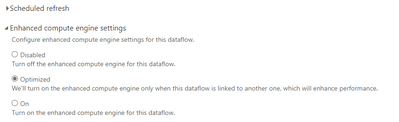
As said, no firm envidence but it might help and is safer than changing something at workspace level.
- Mark as New
- Bookmark
- Subscribe
- Mute
- Subscribe to RSS Feed
- Permalink
- Report Inappropriate Content
Tried both the Premium to Pro to Premium and the Engine with no luck.
What does work is rebuilding the Dataflow in a different Premium Workspace.
Datasets in the Workspace with issues seem to work, Dataflows do not.
- Mark as New
- Bookmark
- Subscribe
- Mute
- Subscribe to RSS Feed
- Permalink
- Report Inappropriate Content
Okay, well it seems to now have started working. I don't know why, all other Workspaces worked fine during this period, even those with Dataflows hitting the same source. That leaves me thinking there was a 4-5 hour issue with this particular Workspace if that is even possible!
Weird morning
- Mark as New
- Bookmark
- Subscribe
- Mute
- Subscribe to RSS Feed
- Permalink
- Report Inappropriate Content
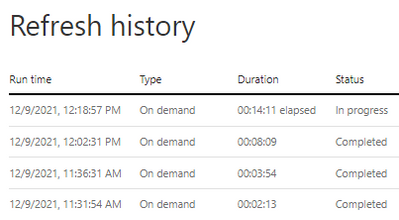
It's back to going in the wronggg direction, each refresh is longer than the last. Something is very strange. I've opened a Ticket and will report back if I learn anything.
- Mark as New
- Bookmark
- Subscribe
- Mute
- Subscribe to RSS Feed
- Permalink
- Report Inappropriate Content
A mind-blowing 24 hours.
The issue resolved on it's own 24 hours later, Microsoft rep could not come up with a cause.
I had a copy of the Dataflow running in a different Workspace in the same Capacity, 0 issues over the 24 hours, while the original continued to perform terribly (as much as 5 hours longer to refresh).
This led us to believe it was literally the Workspace itself with an issue, yet nothing about that Workspace changed or differed from the others. No idea.

Helpful resources

FabCon & SQLCon – Barcelona 2026
Join us in Barcelona for FabCon and SQLCon, the Fabric, Power BI, SQL, and AI community event. Save €200 with code FABCMTY200.

Fabric Community Sticker Challenge - Barcelona 2026
If you love stickers, then you will definitely want to check out our community sticker challenge, Barcelona edition!

Power BI Monthly Update - July 2026
Check out the July 2026 Power BI update to learn about new features.

Power BI DataViz World Championships - June 2026
A new Power BI DataViz World Championship is coming this June! Don't miss out on submitting your entry.

| User | Count |
|---|---|
| 14 | |
| 9 | |
| 9 | |
| 8 | |
| 6 |


