cancel
Showing results for 
Search instead for 
Did you mean: 

July 7 - July 17 | Round 2 of the Power BI Dataviz World Championships. Don't miss your chance! Learn more

Reply
ygangadhara
New Member

Formulas two apply on Row Level


I'm hoping I can get a bit of help. I have data in two Rows need to calculate 3 rd row as mentioned below.


Value 1 & Value 2 are given 

Need to calculate Value3 = Value2/ Value1*100 for all the months


 JanFeb
VALUE11012
VALUE223
VALUE32025


Any help would be greatly apprecaited. 

1 ACCEPTED SOLUTION
Anonymous
Not applicable

Hi @ygangadhara ,

I have created a simple smaple, please refer to it.

let
    Source = Table.FromRows(Json.Document(Binary.Decompress(Binary.FromText("i45WCnP0CXU1VNJRMjQAEUZKsTpQQSMgH4SNlWJjAQ==", BinaryEncoding.Base64), Compression.Deflate)), let _t = ((type nullable text) meta [Serialized.Text = true]) in type table [value = _t, Jan = _t, Feb = _t]),
    #"Changed Type" = Table.TransformColumnTypes(Source,{{"value", type text}, {"Jan", Int64.Type}, {"Feb", Int64.Type}}),
    #"Demoted Headers" = Table.DemoteHeaders(#"Changed Type"),
    #"Changed Type1" = Table.TransformColumnTypes(#"Demoted Headers",{{"Column1", type text}, {"Column2", type any}, {"Column3", type any}}),
    #"Transposed Table" = Table.Transpose(#"Changed Type1"),
    #"Promoted Headers" = Table.PromoteHeaders(#"Transposed Table", [PromoteAllScalars=true]),
    #"Changed Type2" = Table.TransformColumnTypes(#"Promoted Headers",{{"value", type text}, {"VALUE1", Int64.Type}, {"VALUE2", Int64.Type}}),
    #"Added Custom" = Table.AddColumn(#"Changed Type2", "Custom", each ([VALUE2]/[VALUE1])*100),
    #"Renamed Columns" = Table.RenameColumns(#"Added Custom",{{"Custom", "value 3"}}),
    #"Demoted Headers1" = Table.DemoteHeaders(#"Renamed Columns"),
    #"Changed Type3" = Table.TransformColumnTypes(#"Demoted Headers1",{{"Column1", type text}, {"Column2", type any}, {"Column3", type any}, {"Column4", type any}}),
    #"Transposed Table1" = Table.Transpose(#"Changed Type3"),
    #"Promoted Headers1" = Table.PromoteHeaders(#"Transposed Table1", [PromoteAllScalars=true]),
    #"Changed Type4" = Table.TransformColumnTypes(#"Promoted Headers1",{{"value", type text}, {"Jan", Int64.Type}, {"Feb", Int64.Type}})
in
    #"Changed Type4"
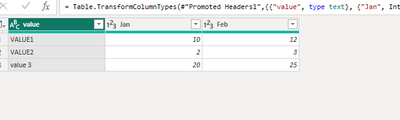
vpollymsft_0-1678761375927.png

How to Get Your Question Answered Quickly 


If it does not help, please provide more details with your desired output and pbix file without privacy information (or some sample data) .


Best Regards
Community Support Team _ Polly

If this post helps, then please consider Accept it as the solution to help the other members find it more quickly.

View solution in original post

1 REPLY 1
Anonymous
Not applicable

Hi @ygangadhara ,

I have created a simple smaple, please refer to it.

let
    Source = Table.FromRows(Json.Document(Binary.Decompress(Binary.FromText("i45WCnP0CXU1VNJRMjQAEUZKsTpQQSMgH4SNlWJjAQ==", BinaryEncoding.Base64), Compression.Deflate)), let _t = ((type nullable text) meta [Serialized.Text = true]) in type table [value = _t, Jan = _t, Feb = _t]),
    #"Changed Type" = Table.TransformColumnTypes(Source,{{"value", type text}, {"Jan", Int64.Type}, {"Feb", Int64.Type}}),
    #"Demoted Headers" = Table.DemoteHeaders(#"Changed Type"),
    #"Changed Type1" = Table.TransformColumnTypes(#"Demoted Headers",{{"Column1", type text}, {"Column2", type any}, {"Column3", type any}}),
    #"Transposed Table" = Table.Transpose(#"Changed Type1"),
    #"Promoted Headers" = Table.PromoteHeaders(#"Transposed Table", [PromoteAllScalars=true]),
    #"Changed Type2" = Table.TransformColumnTypes(#"Promoted Headers",{{"value", type text}, {"VALUE1", Int64.Type}, {"VALUE2", Int64.Type}}),
    #"Added Custom" = Table.AddColumn(#"Changed Type2", "Custom", each ([VALUE2]/[VALUE1])*100),
    #"Renamed Columns" = Table.RenameColumns(#"Added Custom",{{"Custom", "value 3"}}),
    #"Demoted Headers1" = Table.DemoteHeaders(#"Renamed Columns"),
    #"Changed Type3" = Table.TransformColumnTypes(#"Demoted Headers1",{{"Column1", type text}, {"Column2", type any}, {"Column3", type any}, {"Column4", type any}}),
    #"Transposed Table1" = Table.Transpose(#"Changed Type3"),
    #"Promoted Headers1" = Table.PromoteHeaders(#"Transposed Table1", [PromoteAllScalars=true]),
    #"Changed Type4" = Table.TransformColumnTypes(#"Promoted Headers1",{{"value", type text}, {"Jan", Int64.Type}, {"Feb", Int64.Type}})
in
    #"Changed Type4"

vpollymsft_0-1678761375927.png

How to Get Your Question Answered Quickly 


If it does not help, please provide more details with your desired output and pbix file without privacy information (or some sample data) .


Best Regards
Community Support Team _ Polly

If this post helps, then please consider Accept it as the solution to help the other members find it more quickly.

Helpful resources

Announcements
FabCon and SQLCon Barcelona 2026

FabCon & SQLCon – Barcelona 2026

Join us in Barcelona for FabCon and SQLCon, the Fabric, Power BI, SQL, and AI community event. Save €200 with code FABCMTY200.

60 days of Data Days Carousel

Data Days 2026

Join Fabric Data Days 2026: 60 days of free live/on-demand sessions, challenges, study groups, and certification opportunities.

Power BI DataViz World Championships carousel

Power BI DataViz World Championships - June 2026

A new Power BI DataViz World Championship is coming this June! Don't miss out on submitting your entry.