cancel
Showing results for 
Search instead for 
Did you mean: 

Get Fabric Certified for FREE during Fabric Data Days. Don't miss your chance! Request now

Reply
dashboard-1
New Member

Formatting Y-axis

Hi all, 


I have been trying to add a € sign before a value, based on a slicer selection. To do this, I created a measure and used the function FORMAT(x, €#.##). However, it gives me an error. 


Can somebody help? 


1 ACCEPTED SOLUTION
v-yalanwu-msft
Community Support
Community Support

Hi, @dashboard-1 ;

IF you want show in graph, you could create two measures ,because one measure only show one type unless use format. so please try two measures:

Dynamic Display1 =
VAR selectitem =
    IF ( HASONEVALUE ( Selector[Type] ), VALUES ( Selector[Type] ), BLANK () )
RETURN
    SWITCH ( selectitem, "Cost", SUM ( [Cost] ) )
Dynamic Display2 =
VAR selectitem =
    IF ( HASONEVALUE ( Selector[Type] ), VALUES ( Selector[Type] ), BLANK () )
RETURN
    SWITCH ( selectitem, "number", SUM ( [number] ), BLANK () )

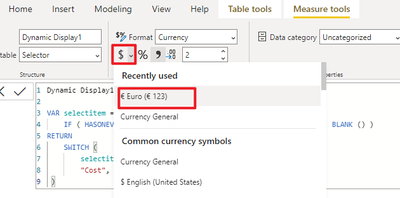
Then change measure1 type

vyalanwumsft_0-1630304541158.png

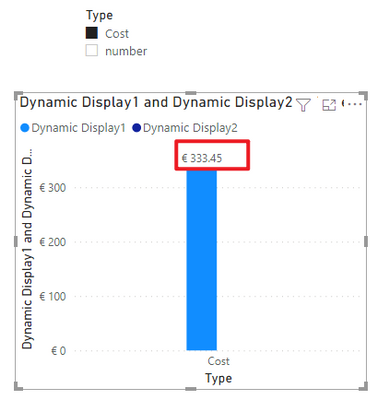
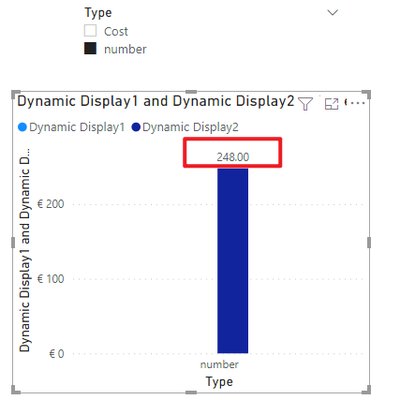
The final output is shown below:

vyalanwumsft_1-1630304726442.png vyalanwumsft_2-1630304757746.png

Best Regards,
Community Support Team_ Yalan Wu
If this post helps, then please consider Accept it as the solution to help the other members find it more quickly.

View solution in original post

5 REPLIES 5
v-yalanwu-msft
Community Support
Community Support

Hi, @dashboard-1 ;

Would you mind accept the helpful replies as solutions? Then we are able to close the thread. More people who have the same requirement will find the solution quickly and benefit here. Thank you.

Best Regards,
Community Support Team_ Yalan Wu
If this post helps, then please consider Accept it as the solution to help the other members find it more quickly.

v-yalanwu-msft
Community Support
Community Support

Hi, @dashboard-1 ;

IF you want show in graph, you could create two measures ,because one measure only show one type unless use format. so please try two measures:

Dynamic Display1 =
VAR selectitem =
    IF ( HASONEVALUE ( Selector[Type] ), VALUES ( Selector[Type] ), BLANK () )
RETURN
    SWITCH ( selectitem, "Cost", SUM ( [Cost] ) )
Dynamic Display2 =
VAR selectitem =
    IF ( HASONEVALUE ( Selector[Type] ), VALUES ( Selector[Type] ), BLANK () )
RETURN
    SWITCH ( selectitem, "number", SUM ( [number] ), BLANK () )

Then change measure1 type

vyalanwumsft_0-1630304541158.png

The final output is shown below:

vyalanwumsft_1-1630304726442.png vyalanwumsft_2-1630304757746.png

Best Regards,
Community Support Team_ Yalan Wu
If this post helps, then please consider Accept it as the solution to help the other members find it more quickly.

Thank you so much! This is working 😀

selimovd
Super User
Super User

Hey @dashboard-1 ,


the format itself has to be in quotes.

Try it like this:

FORMAT(x, "€#.##")


If you need any help please let me know.
If I answered your question I would be happy if you could mark my post as a solution ✔️ and give it a thumbs up 👍
 
Best regards
Denis
 

Hi, 


Thanks for your reply.


I'm trying to convert to a currency when cost is selected at the slicer. The full formula is:

Dynamic Display =
var selectitem=IF(HASONEVALUE(Selector[Type]),VALUES(Selector[Type]),BLANK())
return
SWITCH(selectitem,"Cost",FORMAT([Cost],€#.##),"number",[number],BLANK())
 
This is working in a table, but not a graph.
 
So, with a slicer you can select what value, cost or number, will be shown in the graph. 
The only problem is, that by using FORMAT, the number will go to a text value. And a text value will not be shown in a graph.

I also tried the CURRENCY function, but that is not doing anything. 
 
I hope you can help me... If you choose cost, then the value needs to convert to currency. If you choose number, the value needs to convert to double.
 
Best regards,
Kelly

Helpful resources

Announcements
Fabric Data Days Carousel

Fabric Data Days

Advance your Data & AI career with 50 days of live learning, contests, hands-on challenges, study groups & certifications and more!

October Power BI Update Carousel

Power BI Monthly Update - October 2025

Check out the October 2025 Power BI update to learn about new features.

FabCon Atlanta 2026 carousel

FabCon Atlanta 2026

Join us at FabCon Atlanta, March 16-20, for the ultimate Fabric, Power BI, AI and SQL community-led event. Save $200 with code FABCOMM.

Top Kudoed Authors