Get Fabric or SQL Certified for Free.
Get certified for free when you join Fabric Data Days 2026 and dive into Fabric, Power BI, SQL, AI, and other essential data skills.
Join now- Power BI forums
- Get Help with Power BI
- Desktop
- Service
- Report Server
- Power Query
- Mobile Apps
- Developer
- DAX Commands and Tips
- Custom Visuals Development Discussion
- Health and Life Sciences
- Power BI Spanish forums
- Translated Spanish Desktop
- Training and Consulting
- Instructor Led Training
- Dashboard in a Day for Women, by Women
- Galleries
- Data Stories Gallery
- Themes Gallery
- Contests Gallery
- QuickViz Gallery
- Quick Measures Gallery
- Visual Calculations Gallery
- Notebook Gallery
- Translytical Task Flow Gallery
- TMDL Gallery
- R Script Showcase
- Webinars and Video Gallery
- Ideas
- Custom Visuals Ideas (read-only)
- Issues
- Issues
- Events
- Upcoming Events
Try your skills in the Power BI Dataviz World Championship! Round one ends June 26. Join now
- Power BI forums
- Forums
- Get Help with Power BI
- Service
- Re: Formatting Y-axis
- Subscribe to RSS Feed
- Mark Topic as New
- Mark Topic as Read
- Float this Topic for Current User
- Bookmark
- Subscribe
- Printer Friendly Page

- Mark as New
- Bookmark
- Subscribe
- Mute
- Subscribe to RSS Feed
- Permalink
- Report Inappropriate Content
Formatting Y-axis
Hi all,
I have been trying to add a € sign before a value, based on a slicer selection. To do this, I created a measure and used the function FORMAT(x, €#.##). However, it gives me an error.
Can somebody help?
Solved! Go to Solution.


- Mark as New
- Bookmark
- Subscribe
- Mute
- Subscribe to RSS Feed
- Permalink
- Report Inappropriate Content
Hi, @dashboard-1 ;
IF you want show in graph, you could create two measures ,because one measure only show one type unless use format. so please try two measures:
Dynamic Display1 =
VAR selectitem =
    IF ( HASONEVALUE ( Selector[Type] ), VALUES ( Selector[Type] ), BLANK () )
RETURN
    SWITCH ( selectitem, "Cost", SUM ( [Cost] ) )
Dynamic Display2 =
VAR selectitem =
    IF ( HASONEVALUE ( Selector[Type] ), VALUES ( Selector[Type] ), BLANK () )
RETURN
    SWITCH ( selectitem, "number", SUM ( [number] ), BLANK () )
Then change measure1 type
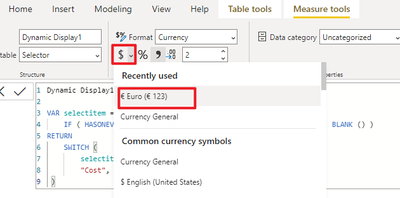
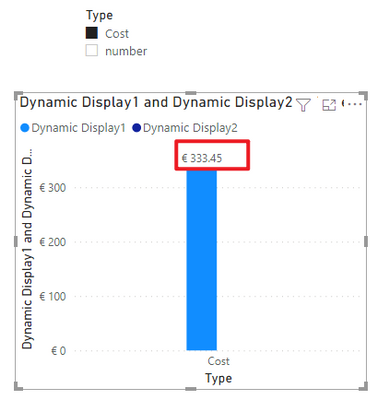
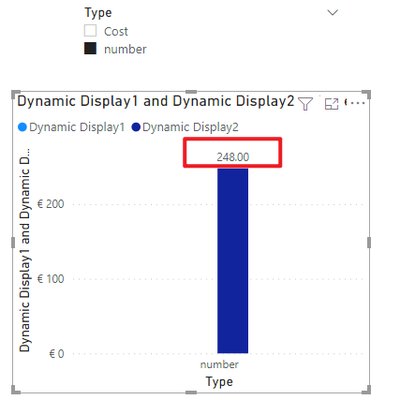
The final output is shown below:
Best Regards,
Community Support Team_ Yalan Wu
If this post helps, then please consider Accept it as the solution to help the other members find it more quickly.
- Mark as New
- Bookmark
- Subscribe
- Mute
- Subscribe to RSS Feed
- Permalink
- Report Inappropriate Content
Hi, @dashboard-1 ;
Would you mind accept the helpful replies as solutions? Then we are able to close the thread. More people who have the same requirement will find the solution quickly and benefit here. Thank you.
Best Regards,
Community Support Team_ Yalan Wu
If this post helps, then please consider Accept it as the solution to help the other members find it more quickly.
- Mark as New
- Bookmark
- Subscribe
- Mute
- Subscribe to RSS Feed
- Permalink
- Report Inappropriate Content
Hi, @dashboard-1 ;
IF you want show in graph, you could create two measures ,because one measure only show one type unless use format. so please try two measures:
Dynamic Display1 =
VAR selectitem =
    IF ( HASONEVALUE ( Selector[Type] ), VALUES ( Selector[Type] ), BLANK () )
RETURN
    SWITCH ( selectitem, "Cost", SUM ( [Cost] ) )
Dynamic Display2 =
VAR selectitem =
    IF ( HASONEVALUE ( Selector[Type] ), VALUES ( Selector[Type] ), BLANK () )
RETURN
    SWITCH ( selectitem, "number", SUM ( [number] ), BLANK () )
Then change measure1 type
The final output is shown below:
Best Regards,
Community Support Team_ Yalan Wu
If this post helps, then please consider Accept it as the solution to help the other members find it more quickly.
- Mark as New
- Bookmark
- Subscribe
- Mute
- Subscribe to RSS Feed
- Permalink
- Report Inappropriate Content
Thank you so much! This is working 😀


- Mark as New
- Bookmark
- Subscribe
- Mute
- Subscribe to RSS Feed
- Permalink
- Report Inappropriate Content
Hey @dashboard-1 ,
the format itself has to be in quotes.
Try it like this:
FORMAT(x, "€#.##")
- Mark as New
- Bookmark
- Subscribe
- Mute
- Subscribe to RSS Feed
- Permalink
- Report Inappropriate Content
Hi,
Thanks for your reply.
I'm trying to convert to a currency when cost is selected at the slicer. The full formula is:
The only problem is, that by using FORMAT, the number will go to a text value. And a text value will not be shown in a graph.
I also tried the CURRENCY function, but that is not doing anything.

Helpful resources

Data Days 2026
Don't miss out on Data Days, June 15 through August 7. Learn Fabric, Power BI, SQL, AI and more.

Power BI DataViz World Championships - June 2026
A new Power BI DataViz World Championship is coming this June! Don't miss out on submitting your entry.

| User | Count |
|---|---|
| 16 | |
| 14 | |
| 13 | |
| 8 | |
| 7 |


| User | Count |
|---|---|
| 40 | |
| 40 | |
| 34 | |
| 28 | |
| 26 |


