Join us at FabCon Atlanta from March 16 - 20, 2026, for the ultimate Fabric, Power BI, AI and SQL community-led event. Save $200 with code FABCOMM.
Register now!The Power BI Data Visualization World Championships is back! It's time to submit your entry. Live now!
I am having issues needed to make a table of 3 columns from a REST API response using Power Query M language.
Below is my code ( at the end of which my table 'newTable' still remains empty.
let
Source = Json.Document(Web.Contents("https://admcorpdev.service-now.com/api/now/stats/incident?sysparm_query=active%3Dtrue%5EpriorityIN1%2C2&sysparm_count=true&sysparm_group_by=caller_id.location.u_region%2Cpriority")),
result = Table.FromRecords(Source[result]),
newTable = #table(
{
"Priority",
"Region",
"Count"
},
{}
),
TableSource = Table.Buffer(result),
data = List.Generate(
() => [x=0],
each [x]<= Table.RowCount(result),
each [
//Generate a new Table and append fields into it
newTable = Table.InsertRows(newTable,1,{[Priority = "2", Region ="NA",Count = "56"]}),
x=[x]+1]
)
in
newTable
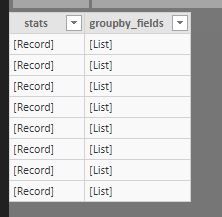
So i have mixed bag of List and record in my data coming in which i want to load in one table with 3 fields.
Hi @Anonymous ,
Try the updated code as below.
let
Source = Json.Document(Web.Contents("https://admcorpdev.service-now.com/api/now/stats/incident?sysparm_query=active%3Dtrue%5EpriorityIN1%2C2&sysparm_count=true&sysparm_group_by=caller_id.location.u_region%2Cpriority")),
result = Table.FromRecords(Source[result]),
newTable = #table(
{
"Priority",
"Region",
"Count"
},
{}
),
TableSource = Table.Buffer(result),
data = List.Generate(
() => [x=0],
each [x]<= Table.RowCount(result),
each [
//Generate a new Table and append fields into it
newTable = Table.InsertRows(newTable,1,{[Priority = "2", Region ="NA",Count = "56"]}),
x=[x]+1]
)
in
TableSource
Regards,
Frank
Hi @Anonymous ,
Does that make sense? If so, kindly mark my answer as the solution to close the case please. Thanks in advance.
The Power BI Data Visualization World Championships is back! It's time to submit your entry.
Check out the January 2026 Power BI update to learn about new features.
| User | Count |
|---|---|
| 22 | |
| 13 | |
| 10 | |
| 8 | |
| 7 |