cancel
Showing results for 
Search instead for 
Did you mean: 

July 7 - July 17 | Round 2 of the Power BI Dataviz World Championships. Don't miss your chance! Learn more

Reply
dschaub626
New Member

Filtering Question

Hello


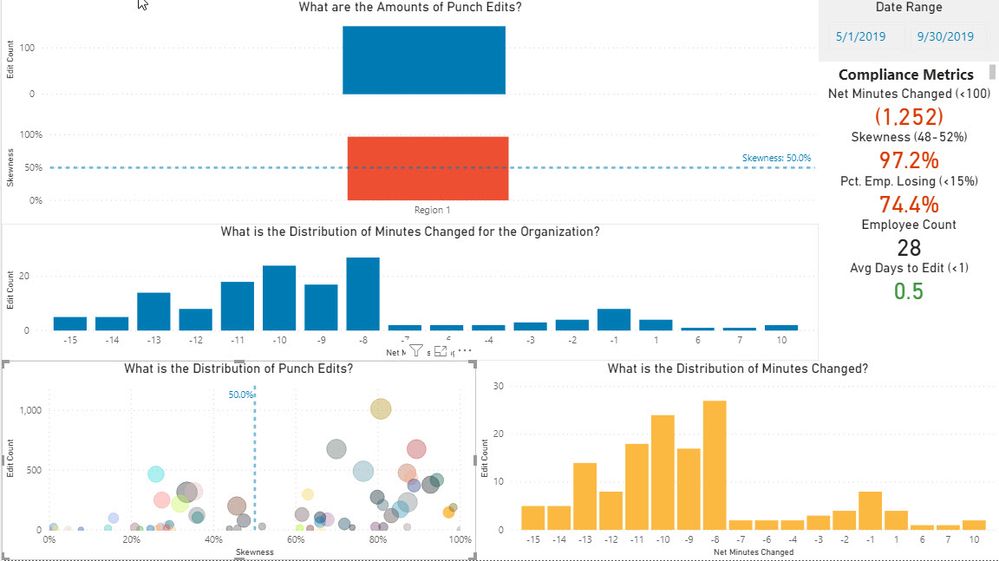
I have created a dashboard looking at Timecard Edits and Skewness, Net Minutes Changed, and Location-level data.  My first visual representation (tile) is looking at the 6 different Regions.  When I select "Region 1" I have another another tile that filters to the locations in Region 1.  Next to the location tile I have specific data showing Net Minutes Changed.  When I select a specific location I get the Net Minutes Changed for that location BUT my location tile now reverts back and shows me every store in every Region.  How can I get this Location tile to only show the locations in Region 1?

1 ACCEPTED SOLUTION
Anonymous
Not applicable

hi @dschaub626 - The Region visual should retain the selection if you hold control + click the second visual. 


Also you can try modifying the interactions between visuals if you do not want selection of 1 visual affecting certain other visuals. 

https://docs.microsoft.com/en-us/power-bi/create-reports/service-reports-visual-interactions


Please mark the post as a solution and provide a 👍 if my comment helped with solving your issue. Thanks!

View solution in original post

5 REPLIES 5
Anonymous
Not applicable

hi @dschaub626 - Would you be able to share a screenshot or a pbix file with sample data so can I analyze and understand the problem better? Thanks! 

Here is a screen shot.  Notice at the top I have clicked on Region 1.  At first the lower left-hand tile was only showing locations in Region 1 but as soon as I select a specific location, the rtile changes and shows me ALL of the stores again in ALL Regions.  Notice that the top tile is still showing Region 1 even though the location tile is showing all locations.Vision Dashboard Filter Issue.jpg

Anonymous
Not applicable

hi @dschaub626 - The Region visual should retain the selection if you hold control + click the second visual. 


Also you can try modifying the interactions between visuals if you do not want selection of 1 visual affecting certain other visuals. 

https://docs.microsoft.com/en-us/power-bi/create-reports/service-reports-visual-interactions


Please mark the post as a solution and provide a 👍 if my comment helped with solving your issue. Thanks!

Thank You!  That worked!

Anonymous
Not applicable

@dschaub626 - Happy to help! 

Helpful resources

Announcements
FabCon and SQLCon Barcelona 2026

FabCon & SQLCon – Barcelona 2026

Join us in Barcelona for FabCon and SQLCon, the Fabric, Power BI, SQL, and AI community event. Save €200 with code FABCMTY200.

60 days of Data Days Carousel

Data Days 2026

Join Fabric Data Days 2026: 60 days of free live/on-demand sessions, challenges, study groups, and certification opportunities.

Power BI DataViz World Championships carousel

Power BI DataViz World Championships - June 2026

A new Power BI DataViz World Championship is coming this June! Don't miss out on submitting your entry.