Join us at FabCon Atlanta from March 16 - 20, 2026, for the ultimate Fabric, Power BI, AI and SQL community-led event. Save $200 with code FABCOMM.
Register now!The Power BI Data Visualization World Championships is back! Get ahead of the game and start preparing now! Learn more
This the Export to Power point now in General Relaese (rather than in Preview?)
If so whyis the Formaying Particularly With respect to Font Size and Images so irratic. We rarely get a Powerpoint Slide that looks exactly like the Report Page. Many titles are Croppeed and incresed in size. likewize image etc. Frankly the PowerPoint image is very poor Qaulity.
Is there any Guidlines on what sizes (oages or fonfonts) we should be using to retain thethe Quality of the Rport Image when Exported
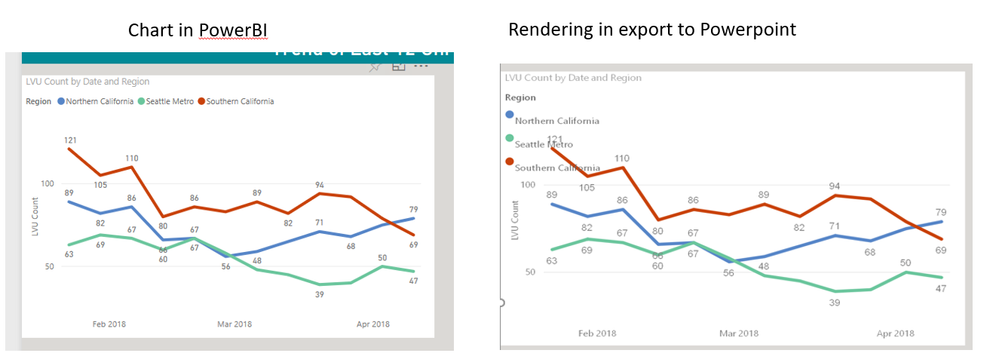
The export to PPT seems to resize visuals using a different resolution. As a result, the labels often get truncated in PowerPoint, whereas the same visual in the PBI service and Web embedded are not truncated and appear fully. Below is an example of truncated labels in PPT. Has anyone found a workaround to avoid this type of issue? Thanks
What it does with Legends can be truely egregious
@Anonymous @v-jiascu-msft;
I would add one big problem :
-custom visuals are not supported by the Export to PowerPoint feature.
Any update regarding that?
Please make it compatible, at least for top 5 custom visuals in the Export to PowerPoint feature.
Thanks !
The Power BI Data Visualization World Championships is back! Get ahead of the game and start preparing now!
| User | Count |
|---|---|
| 77 | |
| 65 | |
| 27 | |
| 23 | |
| 21 |