Get certified for free when you join Fabric Data Days 2026 and dive into Fabric, Power BI, SQL, AI, and other essential data skills.
Join nowData Days is here! Join us now for 60+ days of learning, challenges, and connection. Learn more
Hi All,
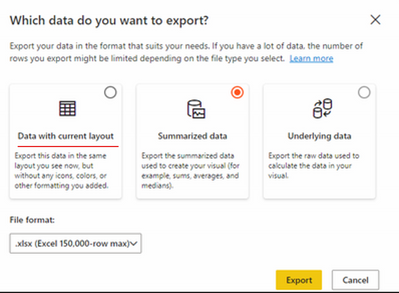
Recently Power BI had given a new feature of exporting data from visuals to excel " Data with current layout" in service.
I dont see this feature anymore in any of the reports and I dont see any options in the settings to enable this option.
How do I get this option back in my reports?
Solved! Go to Solution.
Hi Lucien,
It didn't give me the 'Data with current layout' yesterday, but now it does.
thanks
Herbert
Hi @Anonymous ,
Test like the below,the followiing is a report, choose export data :
Then :
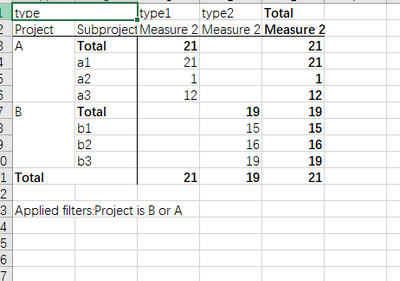
Final open excel:
refer:
Did I answer your question? Mark my post as a solution!
Best Regards
Lucien
Hi Lucien,
It didn't give me the 'Data with current layout' yesterday, but now it does.
thanks
Herbert
Same here.
Desktop version: 2.99.621.0 64-bit (november 2021)
Premium per user license
I can't see it either
Don't miss out on Data Days, June 15 through August 7. Learn Fabric, Power BI, SQL, AI and more.
Check out the May 2026 Power BI update to learn about new features.
| User | Count |
|---|---|
| 16 | |
| 10 | |
| 10 | |
| 8 | |
| 7 |
| User | Count |
|---|---|
| 40 | |
| 36 | |
| 34 | |
| 28 | |
| 20 |