Hi Community,
We have the following configuration for SQL Server (2022):
Server Type: Database Engine Server name: GGP0540\LOGGERNET Authentication: SQL Server Authentication Login: sa Password: MyPassword1$ Successfully connected from another server.
The SERV-MINA gateway (On-Premise for Power BI) has been created. In the Power BI Web, the report has been loaded with its dataset, which connects correctly to the GGP0540 server's database. In the report dataset, the SERV-MINA gateway has been selected in the gateway connection, and the data sources included in this dataset have been created.
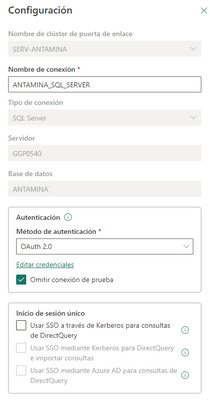
Later, the connection was successfully added.
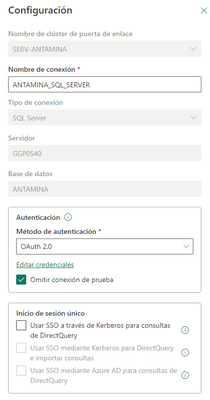
But when synchronizing the information, it displays the following error message.
{"error":{"code":"DM_GWPipeline_Gateway_MashupDataAccessError","pbi.error":{"code":"DM_GWPipeline_Gateway_MashupDataAccessError","parameters":{},"details":[{"code":"DM_ErrorDetailNameCode_UnderlyingErrorCode","detail":{"type":1,"value":"-2147467259"}},{"code":"DM_ErrorDetailNameCode_UnderlyingErrorMessage","detail":{"type":1,"value":"Microsoft SQL: A connection was successfully established with the server, but then an error occurred during the login process. (provider: SSL Provider, error: 0 - La cadena de certificación fue emitida por una entidad en la que no se confía.)"}},{"code":"DM_ErrorDetailNameCode_UnderlyingHResult","detail":{"type":1,"value":"-2147467259"}},{"code":"Microsoft.Data.Mashup.ValueError.Class","detail":{"type":1,"value":"20"}},{"code":"Microsoft.Data.Mashup.ValueError.DataSourceKind","detail":{"type":1,"value":"SQL"}},{"code":"Microsoft.Data.Mashup.ValueError.DataSourcePath","detail":{"type":1,"value":"ggp0540;MINA"}},{"code":"Microsoft.Data.Mashup.ValueError.ErrorCode","detail":{"type":1,"value":"-2146232060"}},{"code":"Microsoft.Data.Mashup.ValueError.Message","detail":{"type":1,"value":"A connection was successfully established with the server, but then an error occurred during the login process. (provider: SSL Provider, error: 0 - La cadena de certificación fue emitida por una entidad en la que no se confía.)"}},{"code":"Microsoft.Data.Mashup.ValueError.Number","detail":{"type":1,"value":"-2146893019"}},{"code":"Microsoft.Data.Mashup.ValueError.Reason","detail":{"type":1,"value":"DataSource.Error"}}],"exceptionCulprit":1}}} Table: TB_97944_N05_CH1.
I think it's due to an SSL issue, but I would like an alternative solution for that error message.

Have a great day!!!!


