cancel
Showing results for 
Search instead for 
Did you mean: 

The Power BI Data Visualization World Championships is back! Get ahead of the game and start preparing now! Learn more

Reply
HarmVanG
Advocate IV
Advocate IV

Error Status code 403 when exporting to PowerPoint

Hello community,


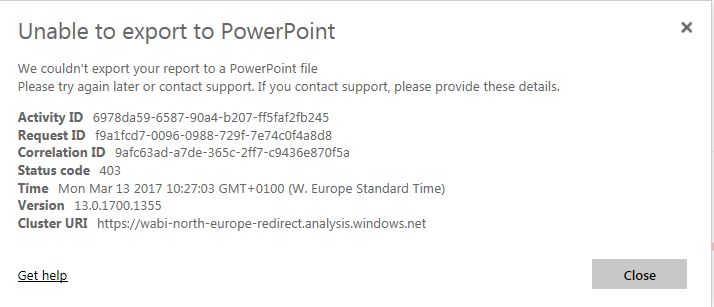
Currently I'm experiencing issues when trying to export my reports to PowerPoint. I get a status code 403

Capture2.PNG

The reports I'm attempting to export are based on a .Pbix file with a size of less than 40MB.

The weird thing is that with another file which has a very similar (almost identical) dataset I don't seem to have this problem.


Does anybody have had a similar problem with this status code who can help me?


With kind regards,


Harm


6 REPLIES 6

Hi,


I am facing a similar issue while trying to access PBIX reports in my production environement. Although, the issue is not recurring, but it is still something which is very annoying. A page refresh will often fix the issues


With regards,


Bikram

Anonymous
Not applicable

Hi @HarmVanG,

I am not able to reproduce your issue when exporting a report that is based on a .PBIX file with size of more than 40MB. Could you please provide a sample report of your scenario so that I can test it?

In addition, does your report contain Custom visuals and R visuals? Currently , Custom visuals and R visuals are not supported when working with the Export to PowerPoint feature, and please check that if your report hits other limitations described in this article.

Thanks,
Lydia Zhang

Hello Lydia,


I'm not using any custom or R visuals.


Do you need the .Pbix file and if so, where can I upload it securely?


With Kind regards,


Harm

Anonymous
Not applicable

Hi @HarmVanG,

I can export your report to PowerPoint without any issues  after publishing PBIX file to Service. I suspect this issue is specific to your environment, I would suggest you to submit a support ticket: Get support.

Thanks,
Lydia Zhang

Hi Lydia,


Thanks for the help. I've opened a support ticket already. I've also had no problems with the anonymized .Pbix file as well, so now I guess I'm looking into what makes the difference in terms of deleted columns.


Thanks again,


Harm van Giersbergen


Anonymous
Not applicable

Hi @HarmVanG,

You can upload PBIX file to OneDrive, then send a Private message containing shared link of PBIX file to me .

Thanks,
Lydia Zhang

Helpful resources

Announcements
Power BI DataViz World Championships

Power BI Dataviz World Championships

The Power BI Data Visualization World Championships is back! Get ahead of the game and start preparing now!

December 2025 Power BI Update Carousel

Power BI Monthly Update - December 2025

Check out the December 2025 Power BI Holiday Recap!

FabCon Atlanta 2026 carousel

FabCon Atlanta 2026

Join us at FabCon Atlanta, March 16-20, for the ultimate Fabric, Power BI, AI and SQL community-led event. Save $200 with code FABCOMM.