cancel
Showing results for 
Search instead for 
Did you mean: 

The Power BI Data Visualization World Championships is back! Get ahead of the game and start preparing now! Learn more

Reply
Anonymous
Not applicable

Enabling Power BI Pro

Hi,


I got Pro license, but not sure how to enable the license, can anyone help me.


Thanks,

Thimma

2 ACCEPTED SOLUTIONS
Greg_Deckler
Community Champion
Community Champion

I imagine this depends on just exactly how things were bought, but for me, I go to https://portal.office.com and logon with my administrator credentials. I go to Users, select the user I want and then expand licenses and assign them the license.


Follow on LinkedIn
@ me in replies or I'll lose your thread!!!
Instead of a Kudo, please vote for this idea
Become an expert!: Enterprise DNA
External Tools: MSHGQM
YouTube Channel!: Microsoft Hates Greg
Latest book!:
DAX For Humans

DAX is easy, CALCULATE makes DAX hard...

View solution in original post

v-sihou-msft
Microsoft Employee
Microsoft Employee

@Anonymous


If you are the administrator, you are already enabled. If you need to assign license to other users within your organization, you can do it in O365 Admin Center. 


  1. In the left navigation bar, select Users > Active Users.

  2. Select their name > Edit.

  3. On the user details page, select Licenses in the left navigation bar.

  4. select Power BI (free), or Power BI Pro, then Save.

Reference:
Administering Power BI in your organization

Regards,

View solution in original post

5 REPLIES 5
v-sihou-msft
Microsoft Employee
Microsoft Employee

@Anonymous


If you are the administrator, you are already enabled. If you need to assign license to other users within your organization, you can do it in O365 Admin Center. 


  1. In the left navigation bar, select Users > Active Users.

  2. Select their name > Edit.

  3. On the user details page, select Licenses in the left navigation bar.

  4. select Power BI (free), or Power BI Pro, then Save.

Reference:
Administering Power BI in your organization

Regards,

Anonymous
Not applicable

Thanks @v-sihou-msft, @ankitpatira and @Greg_Deckler


Got it and resolved by our admin. but its little bit tricky, when Admin login he can see all microsoft products and its nor particular to only Power BI. that is the reason my admin is not giving permission to me only for Power BI.


Does Power BI has Admin?


Thanks,

Thimma

@Anonymous


Yes, Power BI has admin. As mentioned in my provided link, when an user is assigned as Global Admin, you will be able to access the admin portal. 


Regards,

ankitpatira
Community Champion
Community Champion

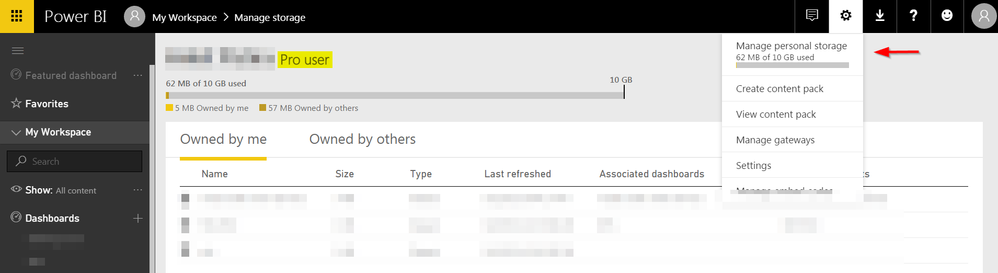
@Anonymous On top of what smoupre said if you're talking about Pro license for yourself, you can check your account type as below.


Capture.PNG

Greg_Deckler
Community Champion
Community Champion

I imagine this depends on just exactly how things were bought, but for me, I go to https://portal.office.com and logon with my administrator credentials. I go to Users, select the user I want and then expand licenses and assign them the license.


Follow on LinkedIn
@ me in replies or I'll lose your thread!!!
Instead of a Kudo, please vote for this idea
Become an expert!: Enterprise DNA
External Tools: MSHGQM
YouTube Channel!: Microsoft Hates Greg
Latest book!:
DAX For Humans

DAX is easy, CALCULATE makes DAX hard...

Helpful resources

Announcements
Power BI DataViz World Championships

Power BI Dataviz World Championships

The Power BI Data Visualization World Championships is back! Get ahead of the game and start preparing now!

December 2025 Power BI Update Carousel

Power BI Monthly Update - December 2025

Check out the December 2025 Power BI Holiday Recap!

FabCon Atlanta 2026 carousel

FabCon Atlanta 2026

Join us at FabCon Atlanta, March 16-20, for the ultimate Fabric, Power BI, AI and SQL community-led event. Save $200 with code FABCOMM.