cancel
Showing results for 
Search instead for 
Did you mean: 

Try your skills in the Power BI Dataviz World Championship! Round one ends June 26. Join now

Reply
Anonymous
Not applicable

Edit Gateway File Path

Hello,


How do I edit the pathway for each of the data sources? We changed some folder names so I need to update these but I can't seem to find an edit button or a delete button.


1 ACCEPTED SOLUTION
v-xuding-msft
Community Support
Community Support

Hi @Anonymous ,

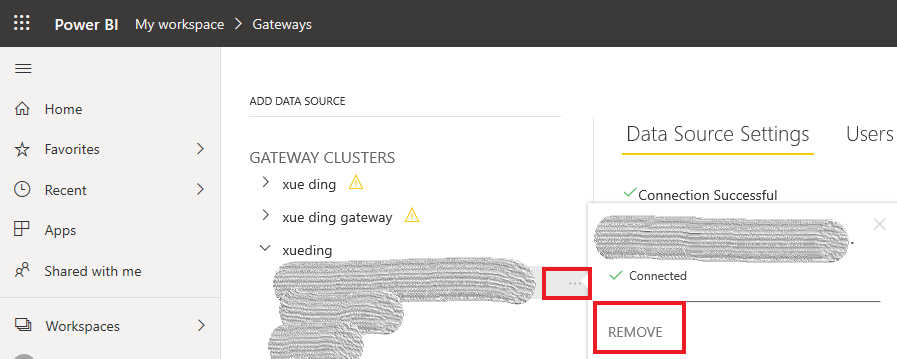
For now, we can't edit data source which is existing. We could remove the original data source and then add a new data source into gateway. Please reference the pic to have a try.

1.PNG

Best Regards,

Xue Ding

If this post helps, then please consider Accept it as the solution to help the other members find it more quickly.

Best Regards,
Xue Ding
If this post helps, then please consider Accept it as the solution to help the other members find it more quickly.

View solution in original post

1 REPLY 1
v-xuding-msft
Community Support
Community Support

Hi @Anonymous ,

For now, we can't edit data source which is existing. We could remove the original data source and then add a new data source into gateway. Please reference the pic to have a try.

1.PNG

Best Regards,

Xue Ding

If this post helps, then please consider Accept it as the solution to help the other members find it more quickly.

Best Regards,
Xue Ding
If this post helps, then please consider Accept it as the solution to help the other members find it more quickly.

Helpful resources

Announcements
Fabric Data Days is here Carousel

Fabric Data Days 2026

Don't miss out on Data Days, June 15 through August 7. Learn Fabric, Power BI, SQL, AI and more.

Power BI DataViz World Championships carousel

Power BI DataViz World Championships - June 2026

A new Power BI DataViz World Championship is coming this June! Don't miss out on submitting your entry.