cancel
Showing results for 
Search instead for 
Did you mean: 

Level up your Power BI skills this month - build one visual each week and tell better stories with data! Get started

Reply
Mike282
Helper III
Helper III

Dynamics 365 TDS endpoint credentials not working in service

Hi all,


So I'm not sure if I'm the only one having issues. So I setup a test power BI report on Desktop using the new Dynamics 365 TDS endpoint. So the I used the SQL server connection to access the data. It all works in Desktop and then I publish it to Service into a workspace. I setup incremental refresh on this test and published it.


I then go to edit credentials on the dataset to ensure credentials are entered so that I can setup scheduled refreshes. 

 

image.png


Everything looks fine and I select OAuth2 which worked previously for my connections to the TDS endpoint. 

image.png


Then nothing. A redirect window pops up and nothing happens and I can't get my credentials updated.
 

It just stays like this permanentlyIt just stays like this permanently


The thing is I have another report on which credentials are added the same way and it works and refreshes fine but for some reason it's not working for me now...


Am I doing something wrong here or is it a bug?


Mike.


1 ACCEPTED SOLUTION

Hi @v-henryk-mstf ,


It's all good now. Spoke with BI support and it was a known issue which they've patched. 

image.png


View solution in original post

4 REPLIES 4
Usman_intbi
Regular Visitor

I'm also having this issue. Should I also call support team?

Didn't they fixed the issue for all customers?

v-henryk-mstf
Community Support
Community Support

Hi @Mike282 ,


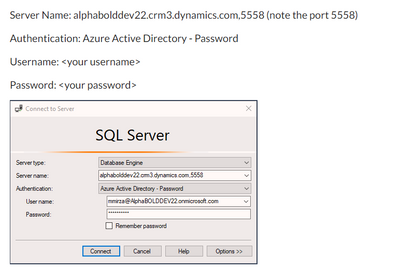
According to your description, change the credentials to the account password of the sql corresponding login.

vhenrykmstf_0-1633332510748.png


You can read related blog:

Using Tabular Data Stream (TDS) with Common Data Service (Dynamics 365) (alphabold.com)


If the problem is still not resolved, please provide detailed error information and let me know immediately. Looking forward to your reply.


Best Regards,
Henry


If this post helps, then please consider Accept it as the solution to help the other members find it more quickly.

Hi @v-henryk-mstf ,


It's all good now. Spoke with BI support and it was a known issue which they've patched. 

image.png


Hi @Mike282 ,


Thank you for your feedback, if the problem has been solved, you can mark a useful reply as the correct answer to help the other members find it more quickly.


If not, please point it out. I will answer you as soon as possible, looking forward to your reply.


Best Regards,
Henry


Helpful resources

Announcements
April Power BI Update Carousel

Power BI Monthly Update - April 2026

Check out the April 2026 Power BI update to learn about new features.

Fabric SQL PBI Data Days

Data Days 2026 coming soon!

Sign up to receive a private message when registration opens and key events begin.

New to Fabric survey Carousel

New to Fabric Survey

If you have recently started exploring Fabric, we'd love to hear how it's going. Your feedback can help with product improvements.

Power BI DataViz World Championships carousel

Power BI DataViz World Championships - June 2026

A new Power BI DataViz World Championship is coming this June! Don't miss out on submitting your entry.