
Join us at FabCon Atlanta from March 16 - 20, 2026, for the ultimate Fabric, Power BI, AI and SQL community-led event. Save $200 with code FABCOMM.
Register now!Vote for your favorite vizzies from the Power BI Dataviz World Championship submissions. Vote now!
Hi there,
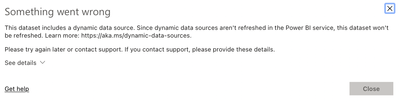
I am trying to configure a report to automatically refresh that use Jira as it's source and getting the following message:
The report I have created requires parameters of the Jira URL and Project Key:
I have tried reading about RelativePath but struggling for what the solution is....can anyone advise?
Solved! Go to Solution.
The solution was:
= Json.Document(Web.Contents(#"Jira URL",[RelativePath = "/rest/api/2/search?jql=project%20%3D%20" & #"Project Key" & "%20AND%20resolved%20%3E%3D%20-52w%20AND%20issuetype%20not%20in%20(Epic)%20order%20by%20created%20DESC"]))
The solution was:
= Json.Document(Web.Contents(#"Jira URL",[RelativePath = "/rest/api/2/search?jql=project%20%3D%20" & #"Project Key" & "%20AND%20resolved%20%3E%3D%20-52w%20AND%20issuetype%20not%20in%20(Epic)%20order%20by%20created%20DESC"]))
Can you provide an answer that considers my parameters and their names? Otherwise this isn't a helpful response 😞
Sorry I'm not sure what that should be given the names of my parameters and the text given what I currently have:
= Json.Document (Web.Contents(#"Jira URL" & "/rest/api/2/search?jql=project%20%3D%20" & #"Project Key" & "%20AND%20resolved%20%3E%3D%20-52w%20AND%20issuetype%20not%20in%20(Epic)%20order%20by%20created%20DESC"))
Could you elaborate?
Try something like this:
let
Source = Json.Document(Web.Contents("https://companyname.atlassian.net/rest/api/3/search?jql=project in ('TEST')", [Headers=[Authorization="Basic " & Credentials]])),
Hi @FlowViz
Try below it should work:
let
Source = Json.Document(Web.Contents("API URL", [Headers=[#"Authorization"="Token <<TOKEN>>"]])),
....
....
Vote for your favorite vizzies from the Power BI World Championship submissions!
If you love stickers, then you will definitely want to check out our Community Sticker Challenge!
Check out the January 2026 Power BI update to learn about new features.
| User | Count |
|---|---|
| 20 | |
| 11 | |
| 10 | |
| 9 | |
| 9 |
| User | Count |
|---|---|
| 54 | |
| 38 | |
| 36 | |
| 25 | |
| 25 |