cancel
Showing results for 
Search instead for 
Did you mean: 

Try your skills in the Power BI Dataviz World Championship! Round one ends June 26. Join now

Reply
perezco
Advocate III
Advocate III

Dynamic RLS with masked user and partner

I am testing out row level security in my pbix file and it is not working as expected.

Looking  in use a  “Single Role for all the User”

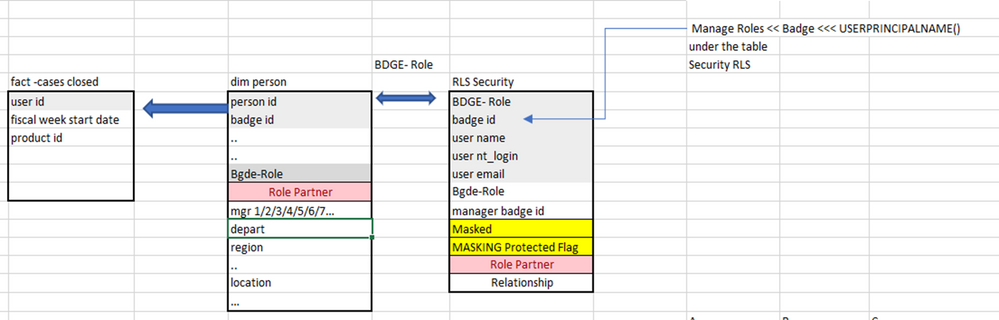
The model has three tables : One is Fact table that has aggregate data,  second Dim -person is just general information of the agent   and third table is RLS security.

Current active relation between tables

Fact table    (user_id)  <--- dim person )person_id)
Dim person (badge_id) <---> RLSE security (badge_id)  M2M.

Reference: https://radacad.com/find-the-data-value-using-lookupvalue-dax-function-in-power-bi-simple-and-useful


MODELmodelmodel

Type of Data from  RLS security table

type of datatype of data


partner

role partnerrole partner

example dataexample data

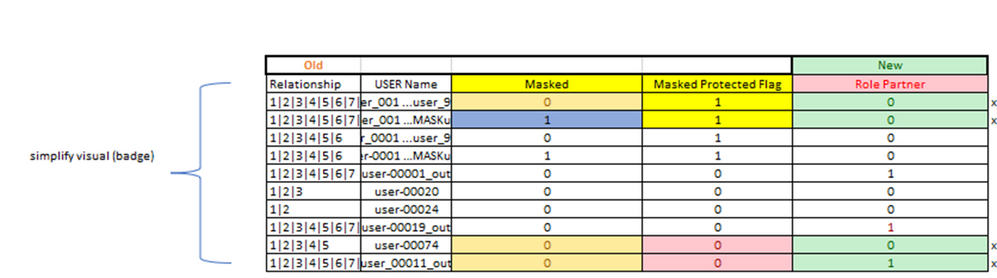
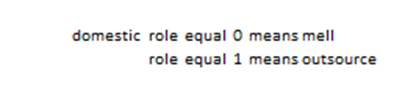
  • "Role Partner column" is designed to limit outsources' access to their data while allowing local users to see all data.
    The "Masked column" is a component of the "Masked Protected flag," and it serves to identify the user who was impacted by the masking. This allow only managers from the same location to view their agents, with the agent's name being Masked= 1 from managers in other locations.
  • Under table 'RLS Security' to have the parent/child relation>> created column
    Relationship = PATH('RLS Security'[USER_BDGE_NBR],'RLS Security'[MGR_BDGE_NBR])
  • Then, under ‘manage roles’ > ‘Manage security roles’
    • Created the role called : RLS Security Mask Partner
    • Then, went to the Table>> ‘RLS Security’
    • And under dax editor added the following
    • But this logic is failing(no error message 😞


VAR upn = SUBSTITUTE(SUBSTITUTE(USERPRINCIPALNAME(), "_","."),"@mall","@mell")
VAR bdg = MAXX(FILTER('RLS Security‘, 'RLS Security ‘[user_Email_ID] = upn),'RLS Security ‘[user_BDGE_NBR])
VAR condition1= PATHCONTAINS('RLS Security ‘[Relationship], bdg)
VAR condition2 = 'RLS Security'[Masked]
VAR condition3= 'RLS Security' [role partner]

Return
( NOT(condition1) && NOT(condition2) && NOT(condition3) )
||
(NOT(condition1) && NOT(condition2) && condition3)
||
(NOT(condition1) && condition2 && NOT(condition3) )
||
(NOT(condition1) && condition2 && condition3)
||
(condition1 && NOT(condition2) && NOT(condition3) )
||
(condition1 && NOT(condition2) && condition3)
||
(condition1 && condition2 && NOT(condition3) )
||
(condition1 && condition2 && condition3)


3 REPLIES 3
perezco
Advocate III
Advocate III

In this moment I can get  from the 'all_in_one RSL' >> user role_partner =  0 or 1   see all .


'existing code' 


VAR upn = SUBSTITUTE(SUBSTITUTE(USERPRINCIPALNAME(), "_","."),"@mall","@mell")
VAR bdg = MAXX(FILTER('RLS Security', 'RLS Security'[user_Email_ID] = upn),'RLS Security ‘[user_BDGE_NBR])
VAR condition1= PATHCONTAINS('RLS Security'[Relationship], bdg)
VAR condition2 = 'RLS Security'[Masked]
VAR condition3= 'RLS Security' [role partner]
Return
// 1,0,1
(condition1 && NOT(condition2) && condition3)
||
//1,1,1
(condition1 && condition2 && condition3)
||
//0,1,0
(NOT(condition1) && condition2 && NOT(condition3) )
||
//0,0,1
(NOT(condition1) && NOT(condition2) && condition3)


But I am  looking

  • user role_partner =  0    see Everything.

user role_partner =  1  see only their data


Conceptual -I 'm not sure this can be done


IF ('RLS Security'[Role Partner] = 0, 
'existing code'...,
'only show own data')


lbendlin
Super User
Super User

Your Return statement will always evaluate to True. Please review it.


Thank you. This means that I have to mantain what I need.

Helpful resources

Announcements
Fabric Data Days is here Carousel

Fabric Data Days 2026

Don't miss out on Data Days, June 15 through August 7. Learn Fabric, Power BI, SQL, AI and more.

May Power BI Update Carousel

Power BI Monthly Update - May 2026

Check out the May 2026 Power BI update to learn about new features.

Power BI DataViz World Championships carousel

Power BI DataViz World Championships - June 2026

A new Power BI DataViz World Championship is coming this June! Don't miss out on submitting your entry.