cancel
Showing results for 
Search instead for 
Did you mean: 

The Power BI Data Visualization World Championships is back! Get ahead of the game and start preparing now! Learn more

Reply
Anonymous
Not applicable

Dynamic RLS With Distribution List

Hello,


I have a report which shows all the ongoing projects. Access to the report is granted to distribution lists (i.e. zzz_global_projects), not to a single e-mail address. Inside this list, there are single users' e-mail addresses.


What I would like to have is each user from this distribution list is able to see only his projects. One of the columns in the project is "Project Leader", based on which the dynamic RLS should be set up.


This is the measure I have in the RLS for role ProjectLeader:

[Project Leader] = lookupvalue(ProjectLeadersRLS[Name In The Report],ProjectLeadersRLS[E-Mail],username())


1. Username() returns e-mail address.

2. These e-mail addresses are mapped in the flat table with the project leader name; for example, homer.simpson@fox.com will be mapped to Homer Simpson based on the above formula. And Homer Simpson is one of the Project Leader names that appear in the column Project Leader.


The challenge I have is that the above solution works for single users (if the access is granted for a single e-mail address), but probably not for the distribution list.


Does anyone know how to solve it?


thanks!

1 ACCEPTED SOLUTION
Anonymous
Not applicable

Hi @Anonymous ,


According to my understanding, you want to set RLS for groups,right?


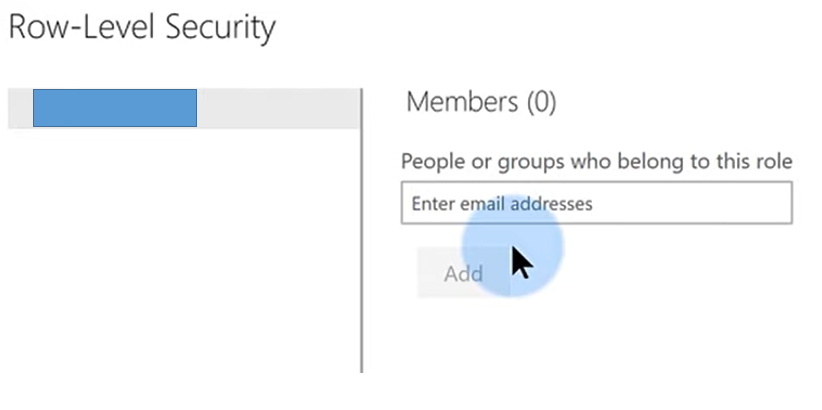
To my knowledge, Distribution List group, Mail-enabled-security group and Security group could be added in below dialog

1.18.4.1.PNG

You could refer to this blog for further help.

See:

Row-level security (RLS) with Power BI

Create, edit, or delete a security group in the Office 365 admin center


Best Regards,
Eyelyn Qin
If this post helps, then please consider Accept it as the solution to help the other members find it more quickly.

View solution in original post

1 REPLY 1
Anonymous
Not applicable

Hi @Anonymous ,


According to my understanding, you want to set RLS for groups,right?


To my knowledge, Distribution List group, Mail-enabled-security group and Security group could be added in below dialog

1.18.4.1.PNG

You could refer to this blog for further help.

See:

Row-level security (RLS) with Power BI

Create, edit, or delete a security group in the Office 365 admin center


Best Regards,
Eyelyn Qin
If this post helps, then please consider Accept it as the solution to help the other members find it more quickly.

Helpful resources

Announcements
Power BI DataViz World Championships

Power BI Dataviz World Championships

The Power BI Data Visualization World Championships is back! Get ahead of the game and start preparing now!

December 2025 Power BI Update Carousel

Power BI Monthly Update - December 2025

Check out the December 2025 Power BI Holiday Recap!

FabCon Atlanta 2026 carousel

FabCon Atlanta 2026

Join us at FabCon Atlanta, March 16-20, for the ultimate Fabric, Power BI, AI and SQL community-led event. Save $200 with code FABCOMM.