Get certified for free when you join Fabric Data Days 2026 and dive into Fabric, Power BI, SQL, AI, and other essential data skills.
Join nowData Days is here! Join us now for 60+ days of learning, challenges, and connection. Learn more
Hello,
I have a report which shows all the ongoing projects. Access to the report is granted to distribution lists (i.e. zzz_global_projects), not to a single e-mail address. Inside this list, there are single users' e-mail addresses.
What I would like to have is each user from this distribution list is able to see only his projects. One of the columns in the project is "Project Leader", based on which the dynamic RLS should be set up.
This is the measure I have in the RLS for role ProjectLeader:
[Project Leader] = lookupvalue(ProjectLeadersRLS[Name In The Report],ProjectLeadersRLS[E-Mail],username())
1. Username() returns e-mail address.
2. These e-mail addresses are mapped in the flat table with the project leader name; for example, homer.simpson@fox.com will be mapped to Homer Simpson based on the above formula. And Homer Simpson is one of the Project Leader names that appear in the column Project Leader.
The challenge I have is that the above solution works for single users (if the access is granted for a single e-mail address), but probably not for the distribution list.
Does anyone know how to solve it?
thanks!
Solved! Go to Solution.
Hi @Anonymous ,
According to my understanding, you want to set RLS for groups,right?
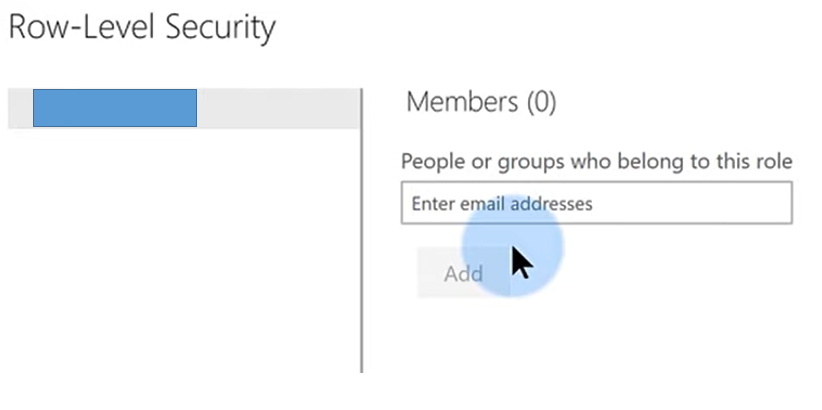
To my knowledge, Distribution List group, Mail-enabled-security group and Security group could be added in below dialog
You could refer to this blog for further help.
See:
Row-level security (RLS) with Power BI
Create, edit, or delete a security group in the Office 365 admin center.
Best Regards,
Eyelyn Qin
If this post helps, then please consider Accept it as the solution to help the other members find it more quickly.
Hi @Anonymous ,
According to my understanding, you want to set RLS for groups,right?
To my knowledge, Distribution List group, Mail-enabled-security group and Security group could be added in below dialog
You could refer to this blog for further help.
See:
Row-level security (RLS) with Power BI
Create, edit, or delete a security group in the Office 365 admin center.
Best Regards,
Eyelyn Qin
If this post helps, then please consider Accept it as the solution to help the other members find it more quickly.
Don't miss out on Data Days, June 15 through August 7. Learn Fabric, Power BI, SQL, AI and more.
Check out the May 2026 Power BI update to learn about new features.
| User | Count |
|---|---|
| 16 | |
| 11 | |
| 10 | |
| 8 | |
| 7 |
| User | Count |
|---|---|
| 41 | |
| 36 | |
| 36 | |
| 28 | |
| 20 |