Get certified for free when you join Fabric Data Days 2026 and dive into Fabric, Power BI, SQL, AI, and other essential data skills.
Join nowData Days is here! Join us now for 60+ days of learning, challenges, and connection. Learn more
HI,
Im struggling to find the information i need,
I have an onsite SQL data source with a gateway setup with the data set published to power BI workspace.
From what I understand the direct query should refrsh every 15 minutes in dashboard view in a browser?
However it is only refreshing on a manual refresh.
Have I done something wrong?
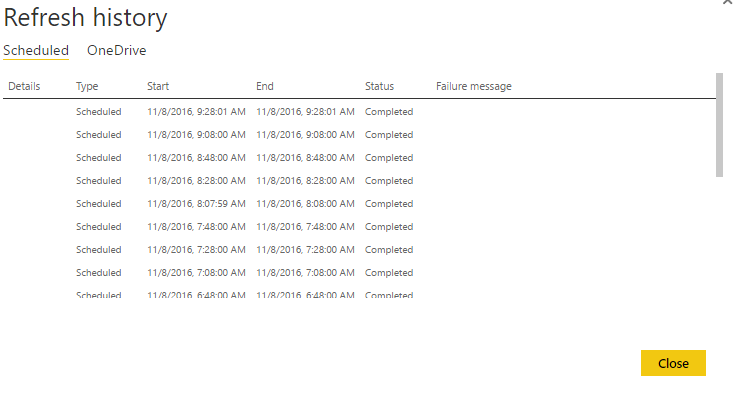
However, After looking furthur, I can see it is refrshing acording to the logs:
It seems the changes are not passing through when in full screen mode?
The dashboard tile refresh per 15 minutes only updates the cache for tile visuals, on the dashboard. But for the underlying dataset with direct query, it actually executes scheduled refresh every 20 to 30 minutes like you seen in refresh history. However, when the underlying data changes, it can't fire a tile refresh to sychronize those data changes to tile immediately. So if you need latest data on demand, I suggest you always refresh the tile manually before checking the data.
Regards,
Thank you for clarifying this,
It makes more sense now that i understand the workings,
it can't fire a tile refresh to sychronize those data changes to tile immediately.
As you say it cant show data imidiatley, is there any form of sheduled refresh at larger intervals?
I have had it partly working usig a browser extension to refresh the webpage every X number of minutes, however it seems very inconsitant, for example, ive seen the data not change for 4 days.
Kind Regards,
Don't miss out on Data Days, June 15 through August 7. Learn Fabric, Power BI, SQL, AI and more.
Check out the May 2026 Power BI update to learn about new features.
| User | Count |
|---|---|
| 16 | |
| 10 | |
| 10 | |
| 8 | |
| 7 |
| User | Count |
|---|---|
| 40 | |
| 36 | |
| 34 | |
| 28 | |
| 20 |