Join us at FabCon Atlanta from March 16 - 20, 2026, for the ultimate Fabric, Power BI, AI and SQL community-led event. Save $200 with code FABCOMM.
Register now!The Power BI Data Visualization World Championships is back! Get ahead of the game and start preparing now! Learn more
Hello,
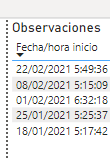
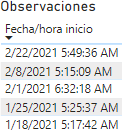
I have a reporter that displays a date with the following format dd / mm / yy, but when uploading it to the workspace it appears as mm / dd / yy, how can I solve it?
Computer:
Workspace
Regards,
Xavi
Solved! Go to Solution.
Hi, there is something that depends on regions. Browser and Power Bi Desktop. If you have "default" data types and formats they will render depending on the configuration of the tools. If you force your browser to your country (that probably shows dd/mm/yyyy), you will fix it.
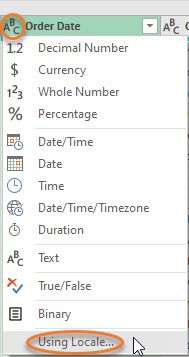
You can also force it in Power Query transform data. You can select an specific format before loading data in order to avoid default date. Just do as the picture shows and then pick "Year" and your wished format:
UsingLocale
Hope that helps,
Happy to help!
Hi, there is something that depends on regions. Browser and Power Bi Desktop. If you have "default" data types and formats they will render depending on the configuration of the tools. If you force your browser to your country (that probably shows dd/mm/yyyy), you will fix it.
You can also force it in Power Query transform data. You can select an specific format before loading data in order to avoid default date. Just do as the picture shows and then pick "Year" and your wished format:
UsingLocale
Hope that helps,
Happy to help!
The Power BI Data Visualization World Championships is back! Get ahead of the game and start preparing now!