cancel
Showing results for 
Search instead for 
Did you mean: 

We've captured the moments from FabCon & SQLCon that everyone is talking about, and we are bringing them to the community, live and on-demand. Starts on April 14th. Register now

Reply
XaviOV
Helper V
Helper V

Different visualisation between web and computer

Hello,

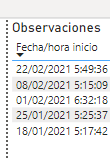
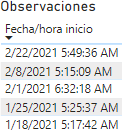
I have a reporter that displays a date with the following format dd / mm / yy, but when uploading it to the workspace it appears as mm / dd / yy, how can I solve it?


Computer:
PBI.png

Workspace

Workspace.png


Regards,


Xavi

1 ACCEPTED SOLUTION
ibarrau
Super User
Super User

Hi, there is something that depends on regions. Browser and Power Bi Desktop. If you have "default" data types and formats they will render depending on the configuration of the tools. If you force your browser to your country (that probably shows dd/mm/yyyy), you will fix it. 
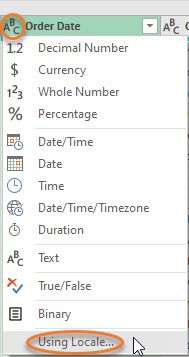
You can also force it in Power Query transform data. You can select an specific format before loading data in order to avoid default date. Just do as the picture shows and then pick "Year" and your wished format:

UsingLocaleUsingLocale

Hope that helps,


If this post helps, then please consider Accept it as the solution to help the other members find it more quickly.

Happy to help!

LaDataWeb Blog

View solution in original post

1 REPLY 1
ibarrau
Super User
Super User

Hi, there is something that depends on regions. Browser and Power Bi Desktop. If you have "default" data types and formats they will render depending on the configuration of the tools. If you force your browser to your country (that probably shows dd/mm/yyyy), you will fix it. 
You can also force it in Power Query transform data. You can select an specific format before loading data in order to avoid default date. Just do as the picture shows and then pick "Year" and your wished format:

UsingLocaleUsingLocale

Hope that helps,


If this post helps, then please consider Accept it as the solution to help the other members find it more quickly.

Happy to help!

LaDataWeb Blog

Helpful resources

Announcements
New to Fabric survey Carousel

New to Fabric Survey

If you have recently started exploring Fabric, we'd love to hear how it's going. Your feedback can help with product improvements.

Power BI DataViz World Championships carousel

Power BI DataViz World Championships - June 2026

A new Power BI DataViz World Championship is coming this June! Don't miss out on submitting your entry.

Join our Fabric User Panel

Join our Fabric User Panel

Share feedback directly with Fabric product managers, participate in targeted research studies and influence the Fabric roadmap.

March Power BI Update Carousel

Power BI Community Update - March 2026

Check out the March 2026 Power BI update to learn about new features.

Top Solution Authors