cancel
Showing results for 
Search instead for 
Did you mean: 

Get Fabric Certified for FREE during Fabric Data Days. Don't miss your chance! Request now

Reply
jesse_james
Helper I
Helper I

Difference between Admins and Users of standard Power BI gateway

hello, can you please help to understand:
what is the difference between Admin and User (of specific data source) on PBI standard gateway? In my company you need to be admin of gateway to have it listed in Manage Gateways. (I am not sure if it is a bug or normal behaviuor). I thought that Users can use congured by Admin data sources in their reports... but recently I made some test for gateway I am admin of. I added my collegue as user to one data source however he cannot see this gateway under Manage Gateways list. I gave him Admin to entire gateway and gateway automatically appeared on this list. Is it a bug or it is normal behaviour? How grant other users permissions to only selected data sources configured on my gateway then?

1 ACCEPTED SOLUTION
ibarrau
Super User
Super User

Hi. It's a tricky thing.

The Administrator is a Gateway role that will allow an email to add, modify and delete all data sources for that specific gateway.

The users are part of the data sources. This means that If you're listed in the Users tab of the data source configured in the gateway, and the server and database name match, you see the gateway as an option to use with scheduled refresh. Like this:


gateway-connection

The user is not a role of the Gateway. 

Hope this make sense.


If this post helps, then please consider Accept it as the solution to help the other members find it more quickly.

Happy to help!

LaDataWeb Blog

View solution in original post

4 REPLIES 4
Anonymous
Not applicable

Hi @jesse_james ,


@ibarrau ' explanation is great. You don't need to set the user as an administrator of the gateway. Please refer to the following content. 

v-yuaj-msft_0-1612318851991.png


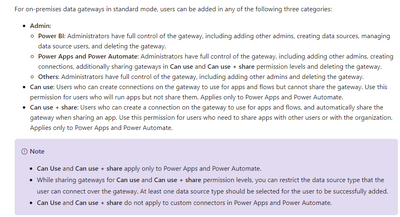
Administrators for the data gatewayAdministrators of the data gateway are permitted to change configuration, and to add new data sources.
Users for the data source in the Power BI ServiceThe users specified for each data source are those who are permitted to:Schedule data refresh in the Power BI Service, or Publish a dataset which uses DirectQuery, or Publish a dataset which uses Analysis Services live connection


Hope that's what you were looking for.

Best Regards,

Yuna


If this post helps, then please consider Accept it as the solution to help the other members find it more quickly.

ibarrau
Super User
Super User

Hi. It's a tricky thing.

The Administrator is a Gateway role that will allow an email to add, modify and delete all data sources for that specific gateway.

The users are part of the data sources. This means that If you're listed in the Users tab of the data source configured in the gateway, and the server and database name match, you see the gateway as an option to use with scheduled refresh. Like this:


gateway-connection

The user is not a role of the Gateway. 

Hope this make sense.


If this post helps, then please consider Accept it as the solution to help the other members find it more quickly.

Happy to help!

LaDataWeb Blog

Thank you! all above is clear. One more question to user tab. Lets Imagine that  gateway admin used  his own credential to configure one of data source for example Azure SQL db and listed among users people how should have lower permissions to data (for example rls). What will happen once these users schedule refresh using admin connection string from gateway? Will they see more data (rows) than they should? Is it sure? How securly manage this?

Hi. The connection and queries will resolve with admin. That is correcto in order to have permissions over the data. The credentials are encrypted so they can't take them. If you want to limit the users data you can do it row by row with the Row Level Security (RLS) feature.

Regards


If this post helps, then please consider Accept it as the solution to help the other members find it more quickly.

Happy to help!

LaDataWeb Blog

Helpful resources

Announcements
November Power BI Update Carousel

Power BI Monthly Update - November 2025

Check out the November 2025 Power BI update to learn about new features.

Fabric Data Days Carousel

Fabric Data Days

Advance your Data & AI career with 50 days of live learning, contests, hands-on challenges, study groups & certifications and more!

FabCon Atlanta 2026 carousel

FabCon Atlanta 2026

Join us at FabCon Atlanta, March 16-20, for the ultimate Fabric, Power BI, AI and SQL community-led event. Save $200 with code FABCOMM.

Top Solution Authors