Get certified for free when you join Fabric Data Days 2026 and dive into Fabric, Power BI, SQL, AI, and other essential data skills.
Join nowJuly 7 - July 17 | Round 2 of the Power BI Dataviz World Championships. Don't miss your chance! Learn more
Is there a way in either the Service or Desktop to get a report of which datasets Import and which ones use DirectQuery? Trying to find ones that are DirectQuery and the only way I know is to go through all of the workspaces and see which ones are not refreshing and then click on those from there.
Hi @TCavins
Is your issue solved? If the issue has been solved, please adopt the solution to help others.
Thanks! 😉
If you still have some question, please don't hesitate to let me known.
Best Regards,
Link
Is that the answer you're looking for? If this post helps, then please consider Accept it as the solution. Really appreciate!
Yes and no. While I can check each individual report manual as some of have shown, I'm looking for some report or easy access in the service to view all at once without having to manually open each report.
Hi @TCavins
Please check this related post.
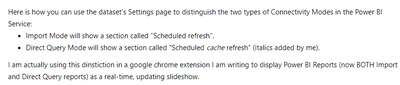
Here is the solution mentioned in the post:
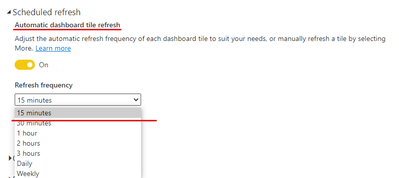
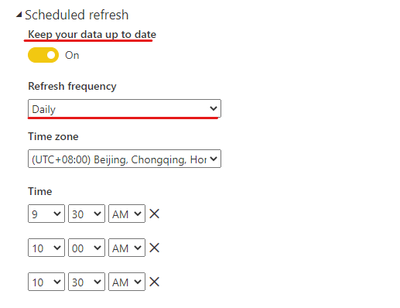
But the current version shows "Scheduled refresh" in both connection modes.
However, we can still determine the two connection modes based on the refresh frequency.
Directquery:
Import:
Hope it helps!
If you still have some question, please don't hesitate to let me known.
Best Regards,
Link
Is that the answer you're looking for? If this post helps, then please consider Accept it as the solution. Really appreciate!
Hey @TCavins ,
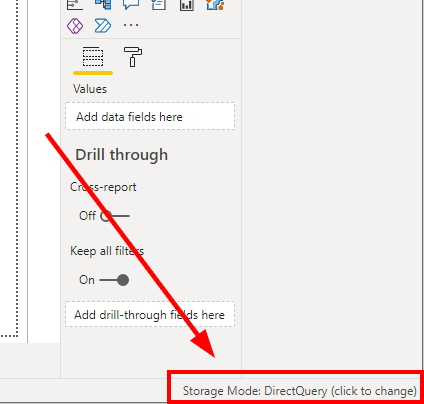
in Power BI Desktop there is not in the bottom right corner when the storage mode is Direct Query or mixed:
Like this you can see if the report is in import or DQ or mixed mode.
Yes, I'm aware of that in the Desktop but we have hundreds of reports and I'd like to not have to open each one individually within the Desktop to find out.
Join us in Barcelona for FabCon and SQLCon, the Fabric, Power BI, SQL, and AI community event. Save €200 with code FABCMTY200.
Check out the July 2026 Power BI update to learn about new features.
Join Data Days 2026: 60 days of free live/on-demand sessions, challenges, study groups, and certification opportunities.
| User | Count |
|---|---|
| 23 | |
| 10 | |
| 9 | |
| 7 | |
| 6 |