This is best Fabric, Power BI, SQL and AI community event. How do we know? The last event sold out! Save €200 with code FABCMTY200.
Register nowA new Data Days event is coming soon! This time we’re going bigger than ever. Fabric, Power BI, SQL, AI and more. Don't miss out.
Hi team,
Question: Can anyone tell me what may be going wrong here?
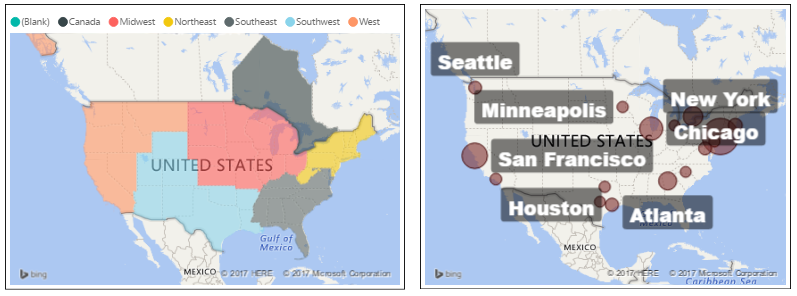
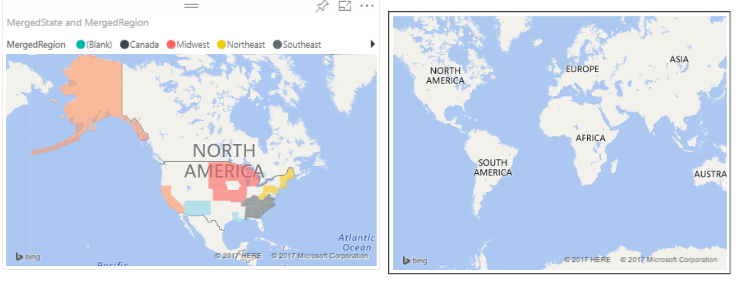
I ran into a problem today with a difference between BI Desktop and BI as a Service (web). The filled map works perfectly in the desktop version, but behaves strangely when uploaded to the service.
Details:
- All data imported into a single table (regions and states)
- Bubble map acts as a counter for density of orders, also adjusts when region is clicked
Problem:
- Filled maps regions stop working when uploaded as a service
- images below show the problem (top is desktop version of the filled map, bottom is the web service version)
BI Desktop capture
BI on the Web capture
Solved! Go to Solution.
Hi @corodyne,
What version of Power BI Desktop are you using? Make sure you're using the the latest version(2.48.4792.721) of Power BI Desktop.
If the issue persists, could you share a sample pbix file which can reproduce the issue, so that we can help further investigate on it? You can upload it to OneDrive or Dropbox and post the link here. Do mask sensitive data before uploading. ![]()
Regards
Hi @corodyne,
What version of Power BI Desktop are you using? Make sure you're using the the latest version(2.48.4792.721) of Power BI Desktop.
If the issue persists, could you share a sample pbix file which can reproduce the issue, so that we can help further investigate on it? You can upload it to OneDrive or Dropbox and post the link here. Do mask sensitive data before uploading. ![]()
Regards
I think this got fixed. I tried the map again and it worked. So, perhaps it was fixed behind the scenes.
Best,
Hi @corodyne,
Great to hear the problem got fixed. Could you accept your reply above as solution to close this thread? ![]()
Regards
Will do, thanks!
Check out the May 2026 Power BI update to learn about new features.
Sign up to receive a private message when registration opens and key events begin.
If you have recently started exploring Fabric, we'd love to hear how it's going. Your feedback can help with product improvements.
| User | Count |
|---|---|
| 8 | |
| 8 | |
| 7 | |
| 7 | |
| 7 |
| User | Count |
|---|---|
| 21 | |
| 21 | |
| 18 | |
| 16 | |
| 11 |