This is best Fabric, Power BI, SQL and AI community event. How do we know? The last event sold out! Save €200 with code FABCMTY200.
Register nowA new Data Days event is coming soon! This time we’re going bigger than ever. Fabric, Power BI, SQL, AI and more. Don't miss out.
Hello,
The Development Workspace is acting very wonky and not as expected, because it has worked as advertised and expected for a few months now.
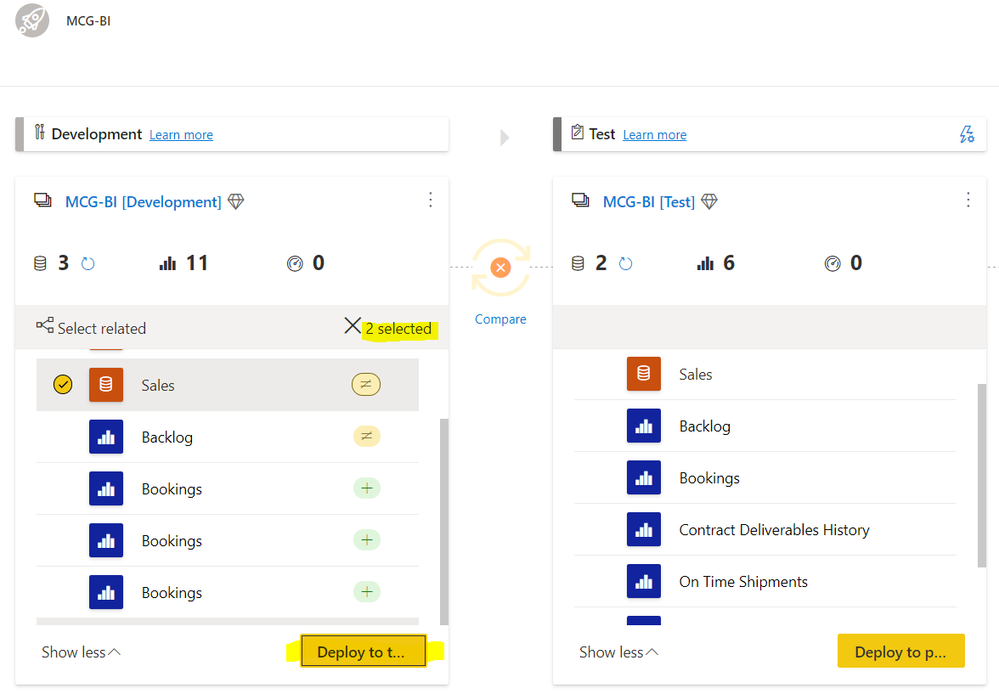
Behavior: I have my 2 selected content pieces, "Sales" Report and Dataset, selected and when I hit the "Deploy to Test" button, no action takes place. no error message takes place.
When I select the blue text "compare" between Dev and Test, The comparison math signs are not displaying between the two workspaces like they are for the blue text "compare" between Test and Prod.
I am able to successfully deploy content from Test to Prod using the "Deploy to Production" button.
What is the difference? Why am I not able to deploy content from Dev to Test?
Solved! Go to Solution.
This sounds like a bug.
Is this happening also when your datasets are not being refreshed (as shown in the image)?
Anyway, please open a support ticket.
I submitted the ticket and Microsoft got a fix in. I tested this morning, and the functionality of the button is now working as expected.
This sounds like a bug.
Is this happening also when your datasets are not being refreshed (as shown in the image)?
Anyway, please open a support ticket.
Check out the May 2026 Power BI update to learn about new features.
Sign up to receive a private message when registration opens and key events begin.
If you have recently started exploring Fabric, we'd love to hear how it's going. Your feedback can help with product improvements.
| User | Count |
|---|---|
| 11 | |
| 10 | |
| 7 | |
| 7 | |
| 7 |
| User | Count |
|---|---|
| 28 | |
| 25 | |
| 22 | |
| 21 | |
| 21 |