Don't miss your chance to take the Fabric Data Engineer (DP-600) exam for FREE! Find out how by attending the DP-600 session on April 23rd (pacific time), live or on-demand.
Learn moreNext up in the FabCon + SQLCon recap series: The roadmap for Microsoft SQL and Maximizing Developer experiences in Fabric. All sessions are available on-demand after the live show. Register now
Good afternoon,
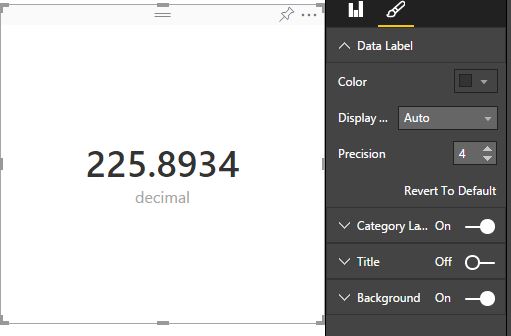
The cards aren't showing full decimal precision - in the Power BI Designer it shows to two decimals and when I upload it it rounds to the nearest integer. Any ideas?
Thanks.
@Blinks Make sure the data set has the level of precision you want in the data section of the desktop file. Load the file to the site. Highlight the card - > Data Label - > Precision -> set the precision you want.
If you have recently started exploring Fabric, we'd love to hear how it's going. Your feedback can help with product improvements.
A new Power BI DataViz World Championship is coming this June! Don't miss out on submitting your entry.
| User | Count |
|---|---|
| 11 | |
| 11 | |
| 9 | |
| 8 | |
| 8 |