cancel
Showing results for 
Search instead for 
Did you mean: 

Get Fabric certified for FREE! Don't miss your chance! Learn more

Reply
Blinks
Regular Visitor

Decimal Precision

Good afternoon,


The cards aren't showing full decimal precision - in the Power BI Designer it shows to two decimals and when I upload it it rounds to the nearest integer. Any ideas?


Thanks.

1 REPLY 1
Anonymous
Not applicable

@Blinks Make sure the data set has the level of precision you want in the data section of the desktop file. Load the file to the site. Highlight the card - > Data Label - > Precision -> set the precision you want.
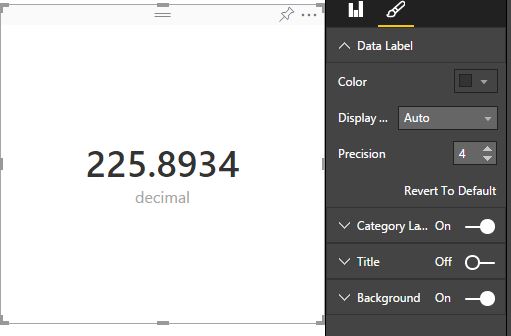
Capture.JPG

Helpful resources

Announcements
Sticker Challenge 2026 Carousel

Join our Community Sticker Challenge 2026

If you love stickers, then you will definitely want to check out our Community Sticker Challenge!

January Power BI Update Carousel

Power BI Monthly Update - January 2026

Check out the January 2026 Power BI update to learn about new features.

FabCon Atlanta 2026 carousel

FabCon Atlanta 2026

Join us at FabCon Atlanta, March 16-20, for the ultimate Fabric, Power BI, AI and SQL community-led event. Save $200 with code FABCOMM.